Kubernetes Basics :: Learning slides

Introduction

Kubernetes is an open-source platform that automates the deployment, scaling, networking, and management of containerized applications across a cluster.
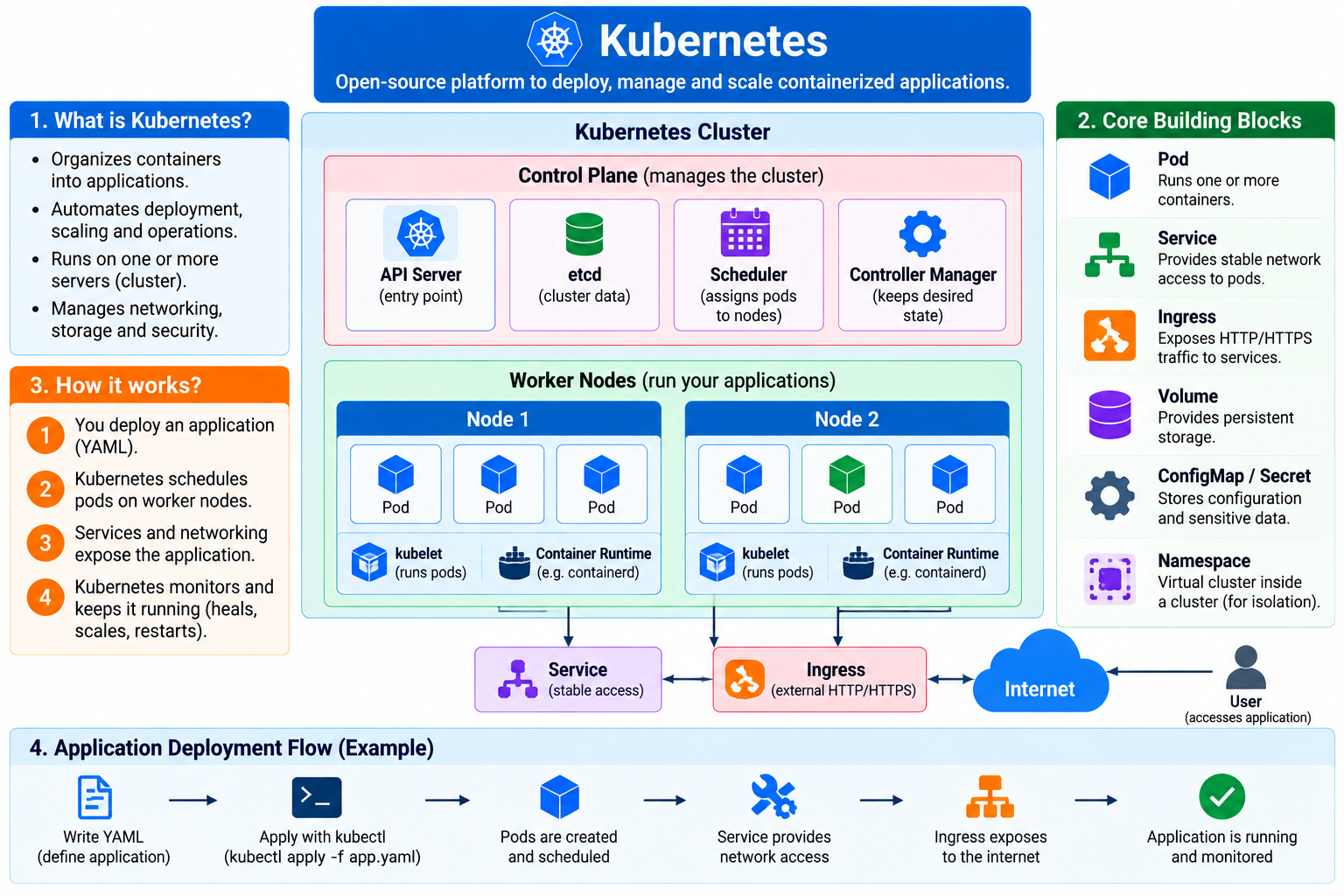
  1. Kubernetes Foundations: Containers vs Kubernetes, cluster concepts, control plane vs worker nodes
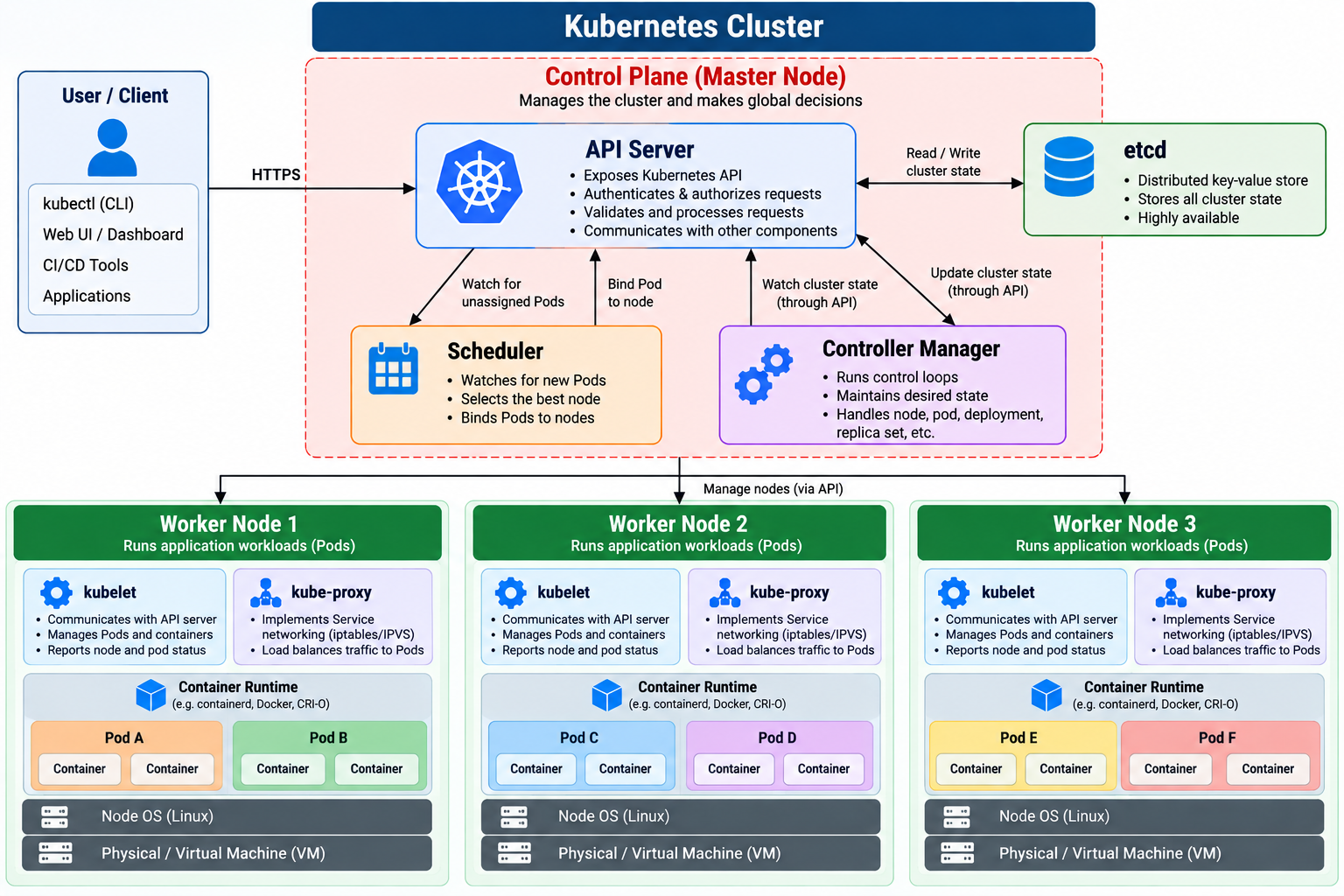
Useful commands:

kubectl version, kubectl cluster-info, kubectl get nodes

2. Kubernetes Architecture: API Server, Scheduler, Controller Manager, etcd, kubelet, kube-proxy
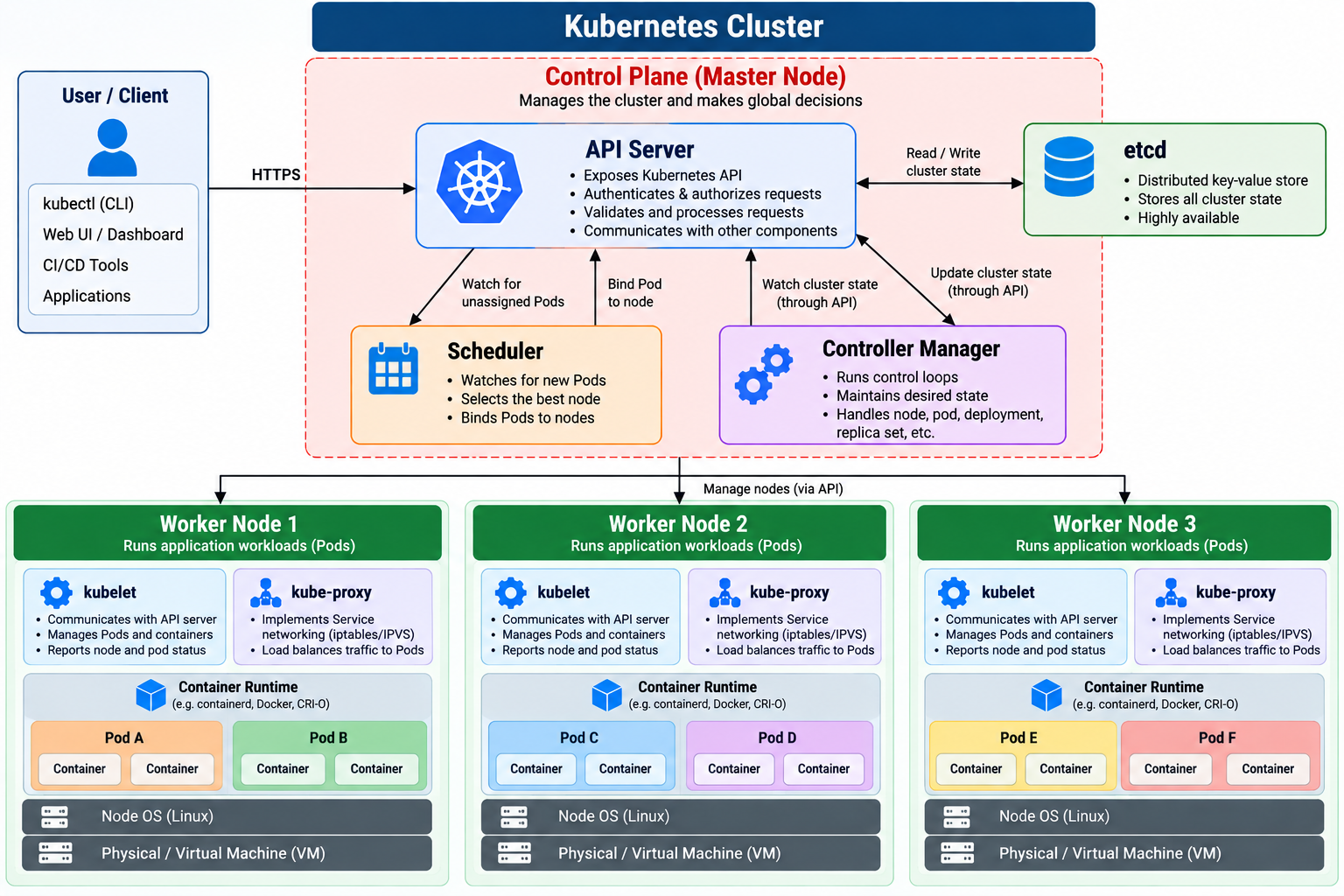
Useful commands:

kubectl get pods -A, kubectl describe node

3. Cluster Installation: kubeadm, kubelet, kubectl, container runtime, cluster bootstrap
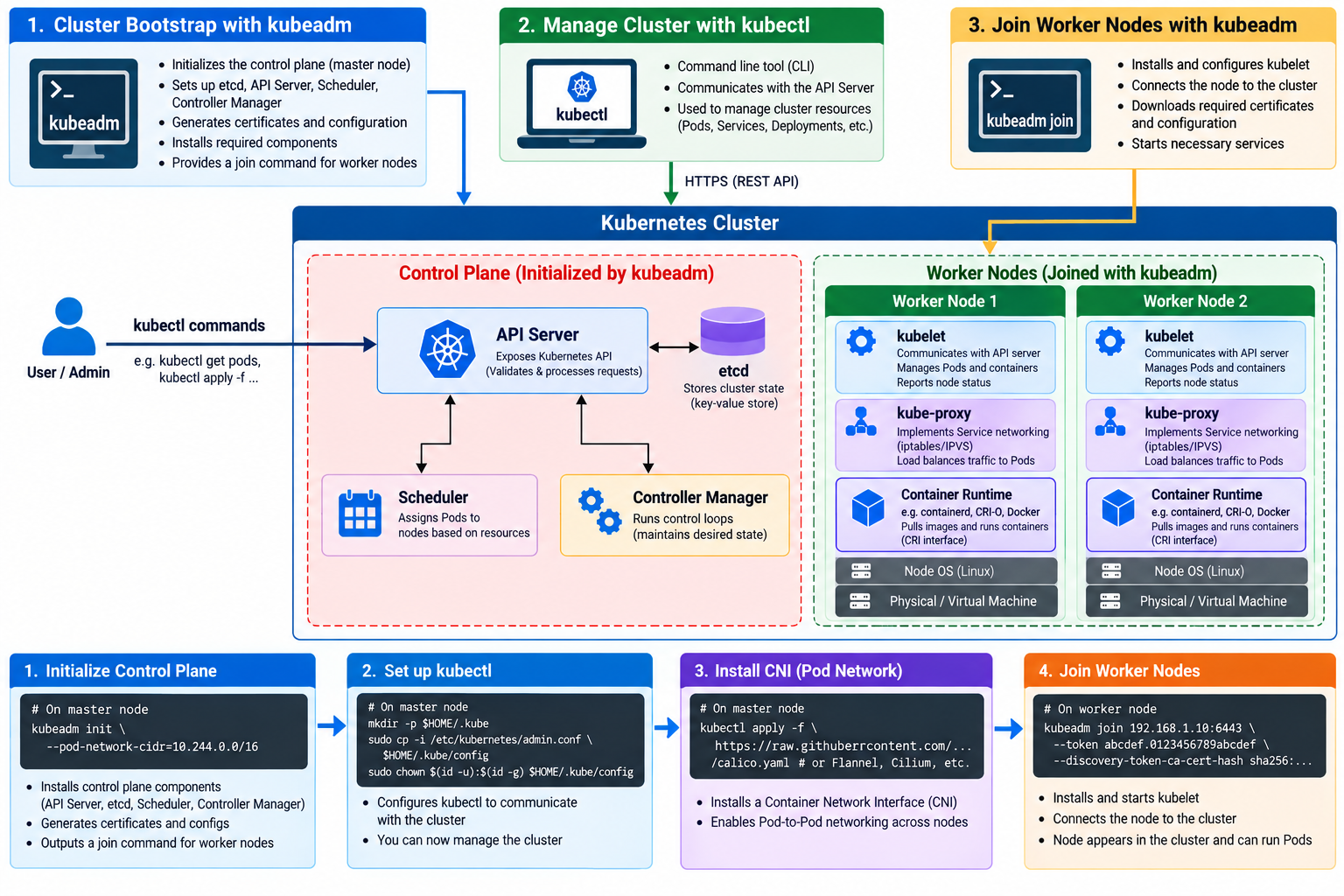
Useful commands:

kubeadm init, kubeadm join, kubectl get nodes

4. Pods & API Objects: Pods, YAML, namespaces, labels, annotations
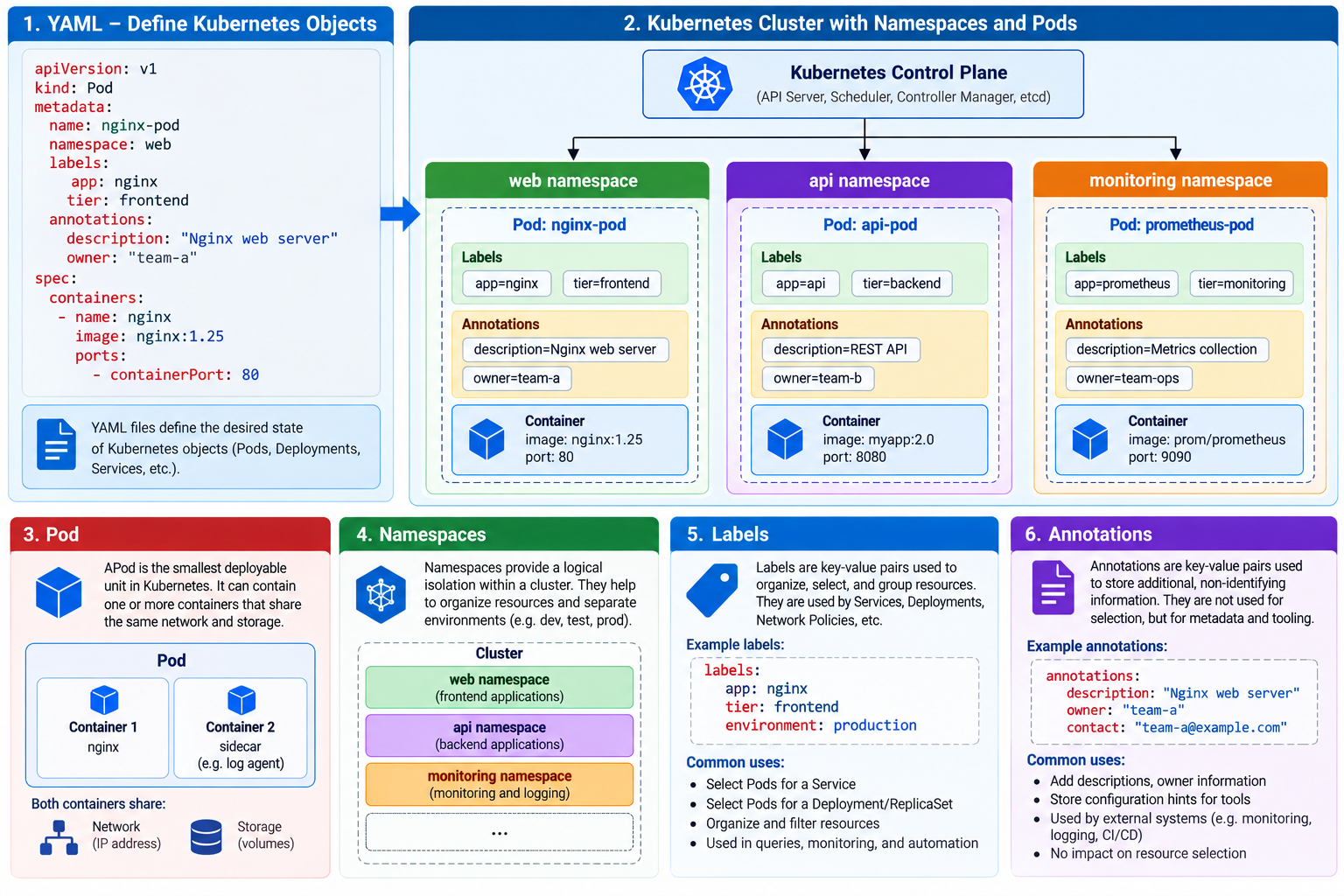
Useful commands:

kubectl run, kubectl get pod, kubectl describe, kubectl apply -f

5. Deployments & Workloads: ReplicaSets, Deployments, scaling, rolling updates, rollback
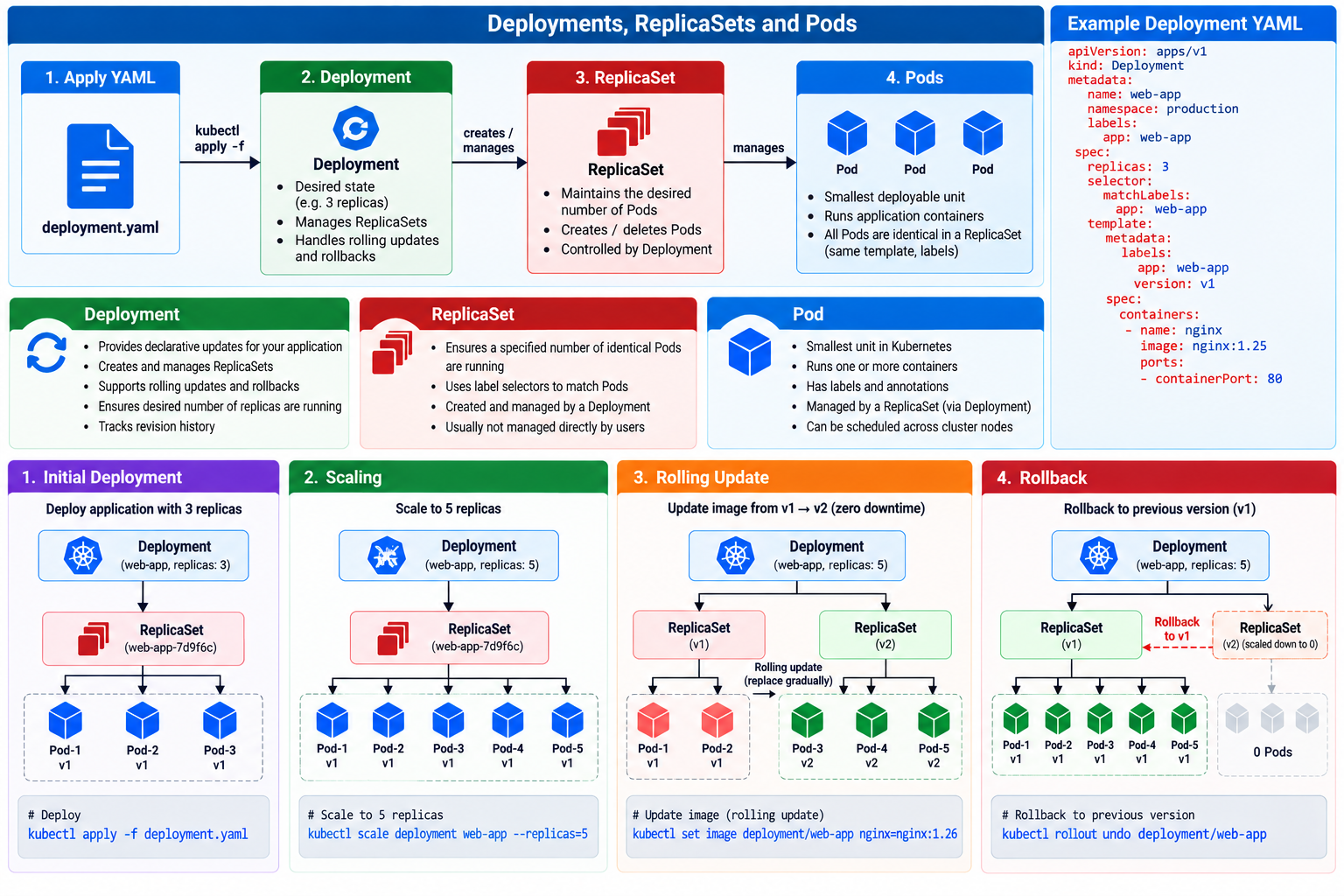
Useful commands:

kubectl create deployment, kubectl scale, kubectl rollout

6. Services & Networking: ClusterIP, NodePort, service discovery, DNS, pod networking
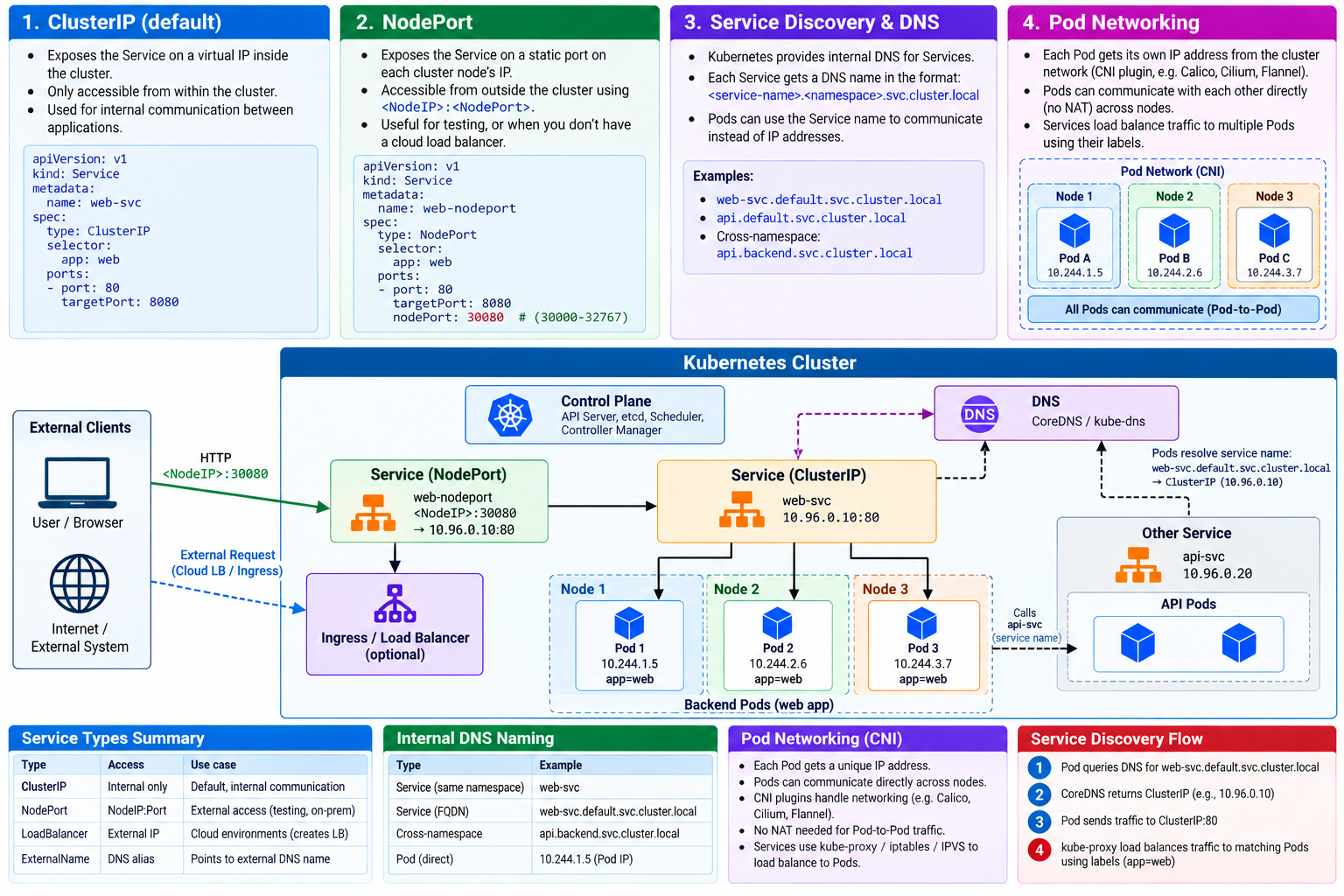
Useful commands:

kubectl expose, kubectl get svc, kubectl get endpoints

7. Ingress & Gateway: Ingress Controller, HTTP routing, Gateway API
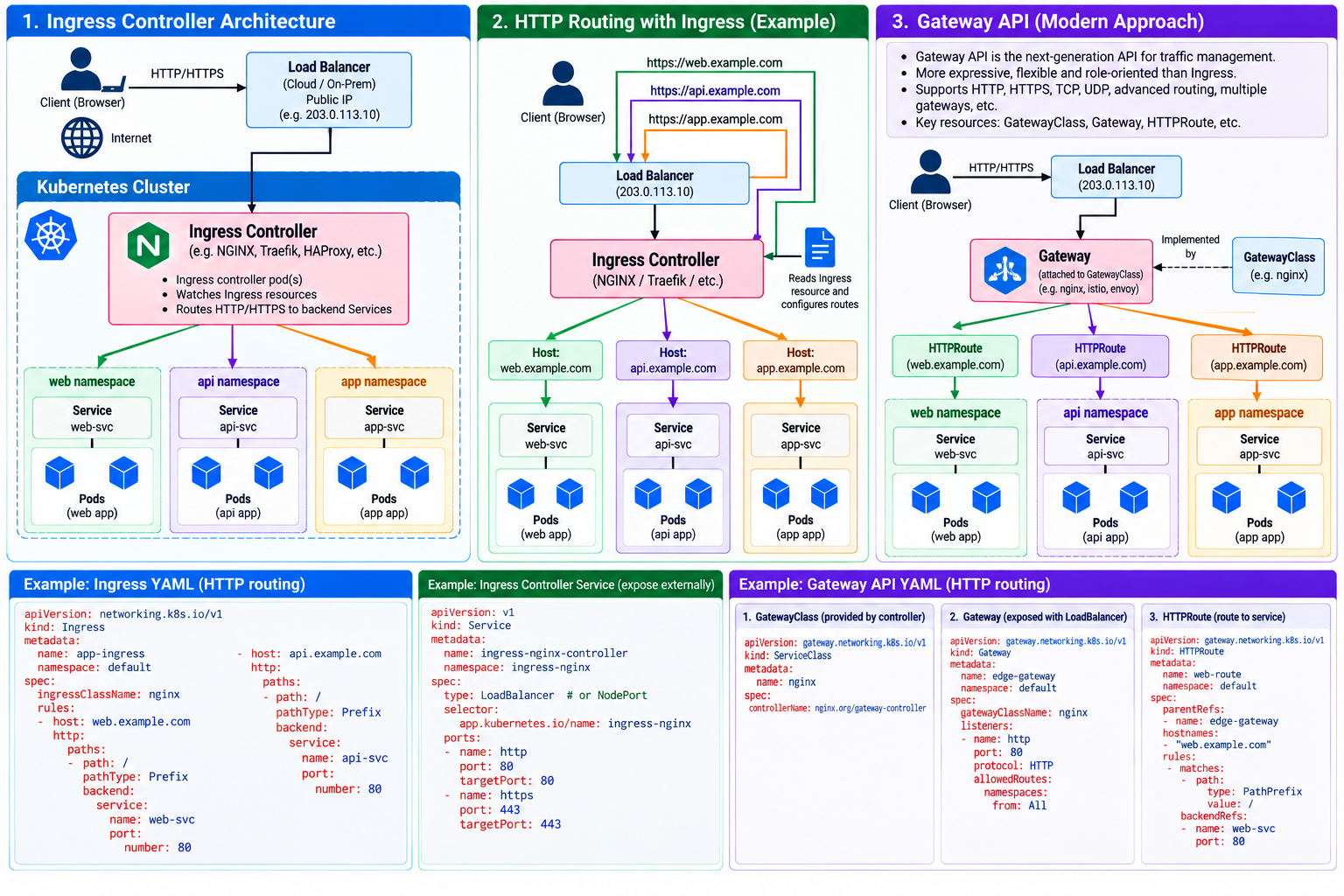
Useful commands:

Create an Ingress and route traffic to two Services

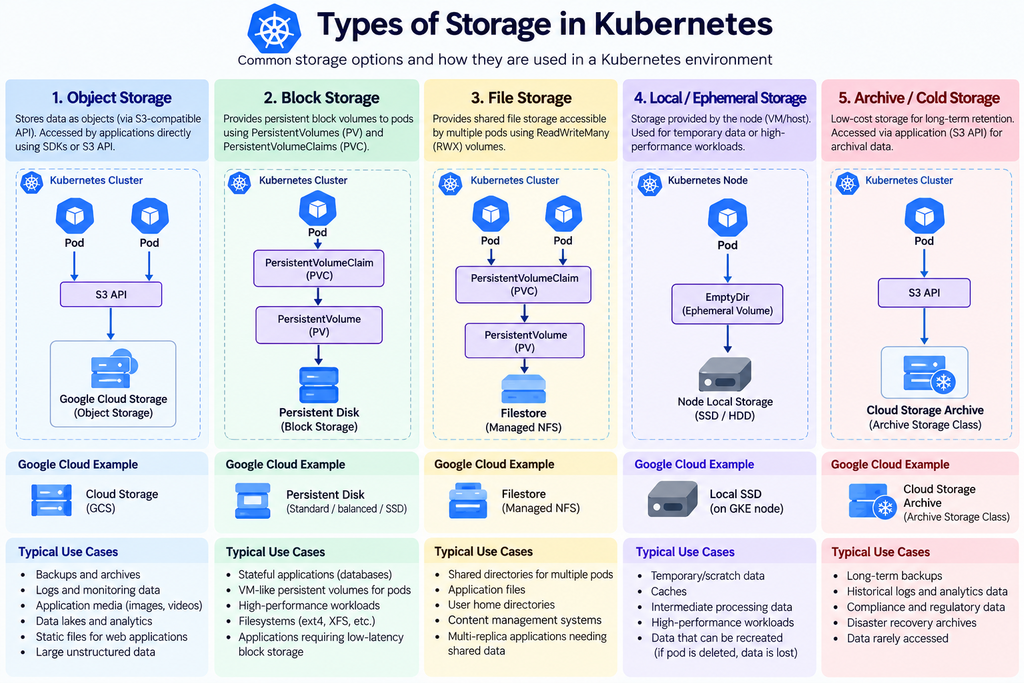
8. Kubernetes Storage: Volumes, PV, PVC, StorageClass, CSI, Ceph integration
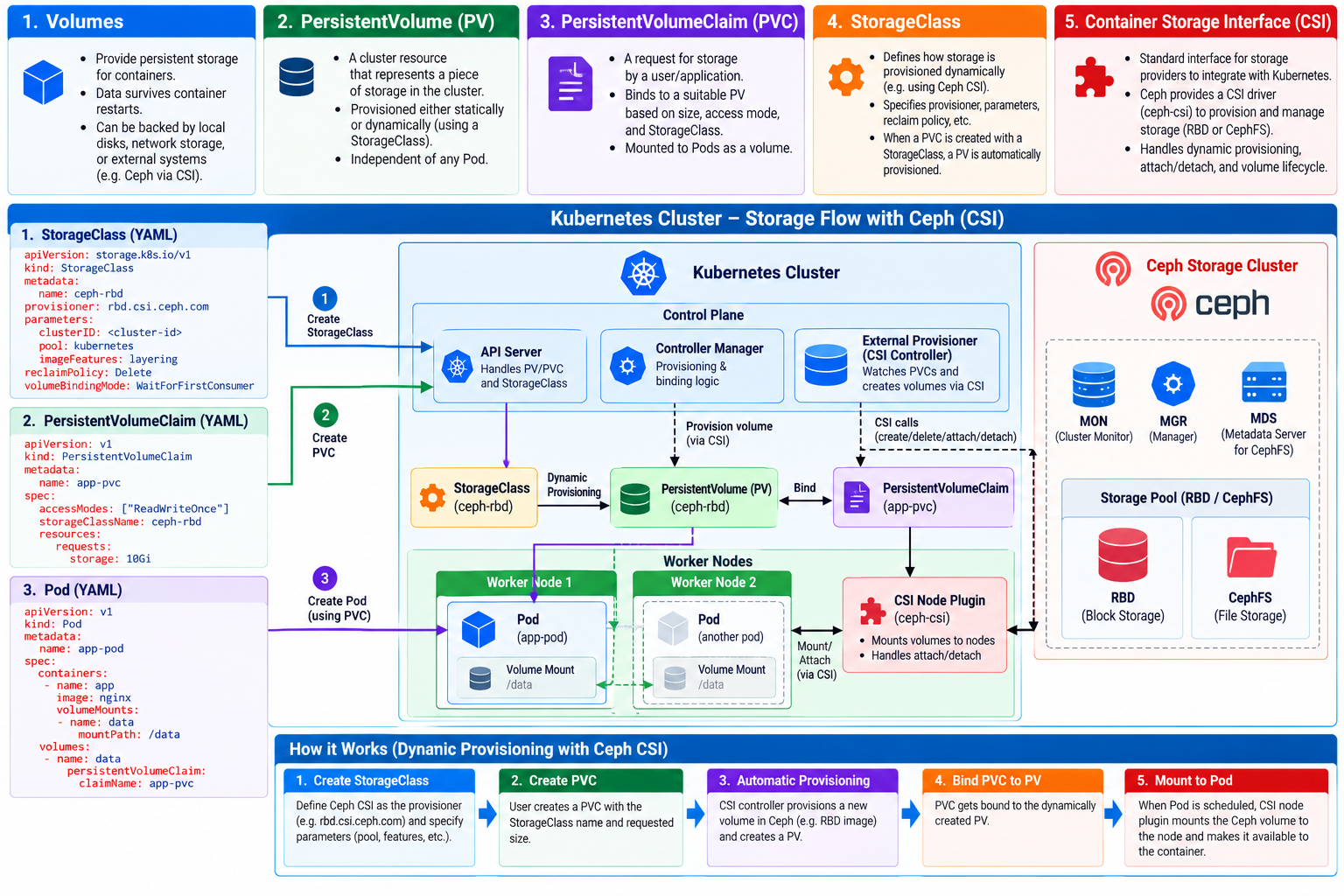
Useful commands:

kubectl get pv,pvc,sc, create PVC and mount into a Pod

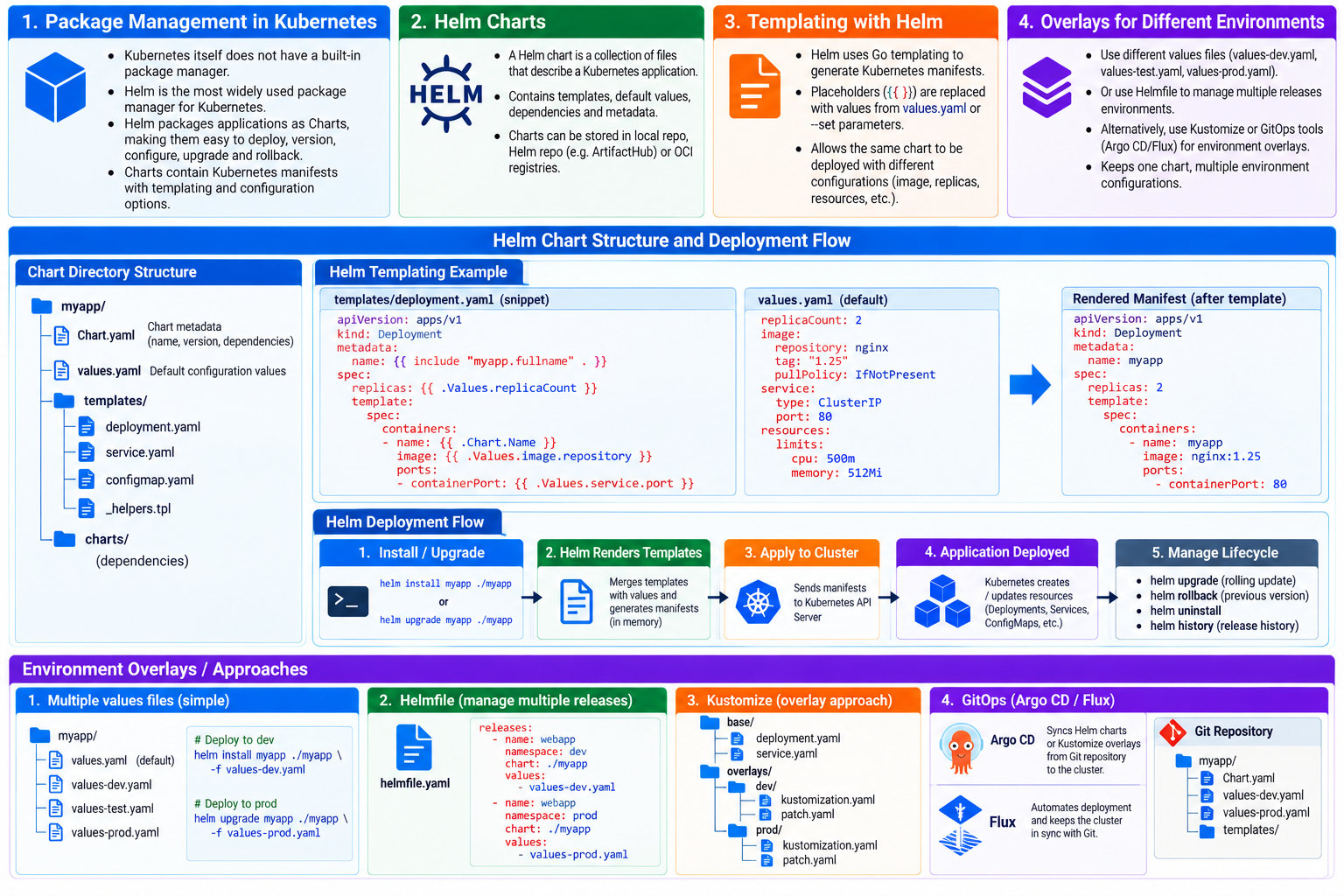
9. Helm & Kustomize: Package management, Helm charts, templating, overlays
Useful commands:

helm install, helm list, helm upgrade, kubectl apply -k

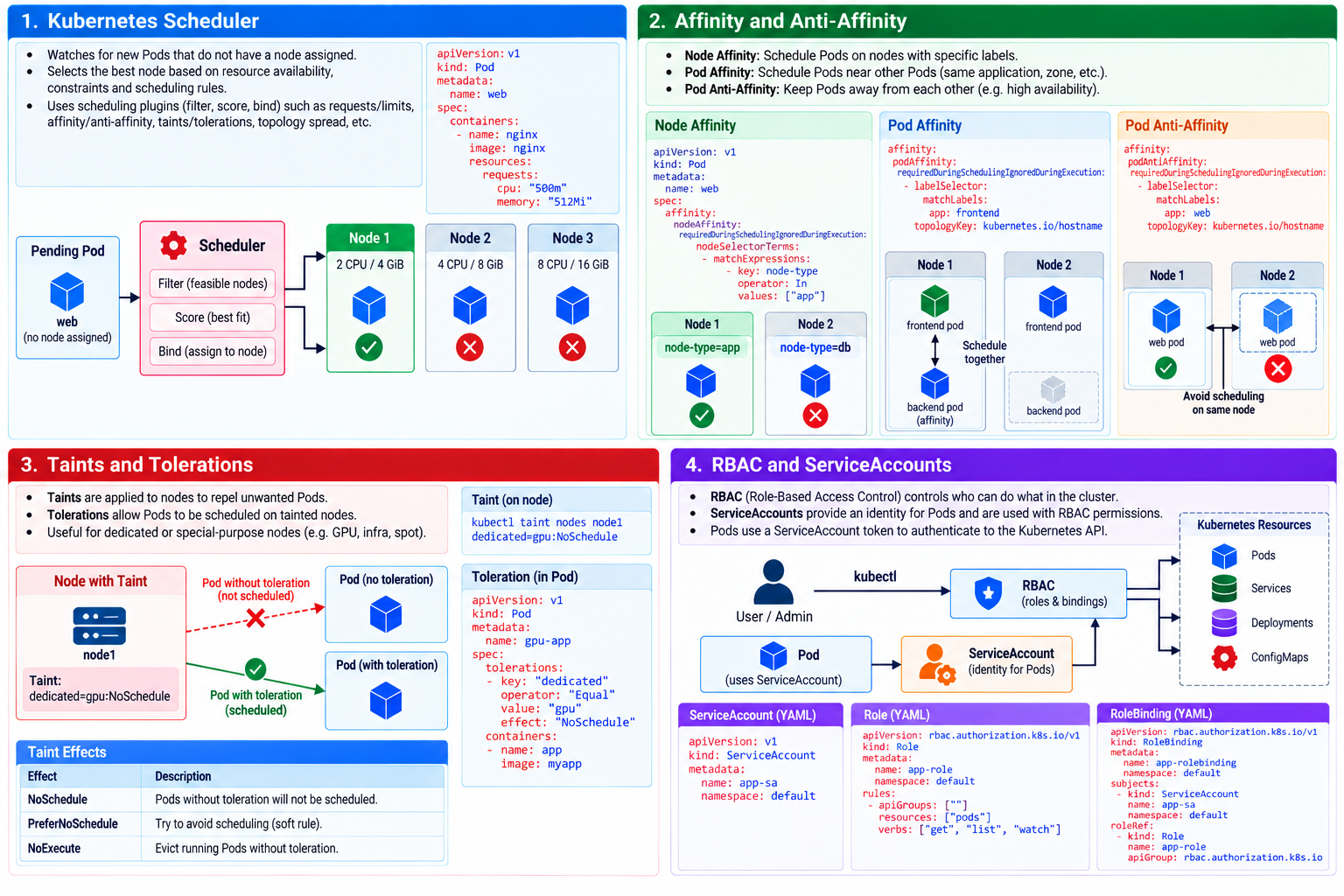
10. Scheduling & Security: Scheduler, affinity, taints/tolerations, RBAC, ServiceAccounts
Useful commands:

kubectl taint, kubectl auth can-i, kubectl create role

11. Troubleshooting & Logging: Logs, events, failed Pods, networking, resource problems
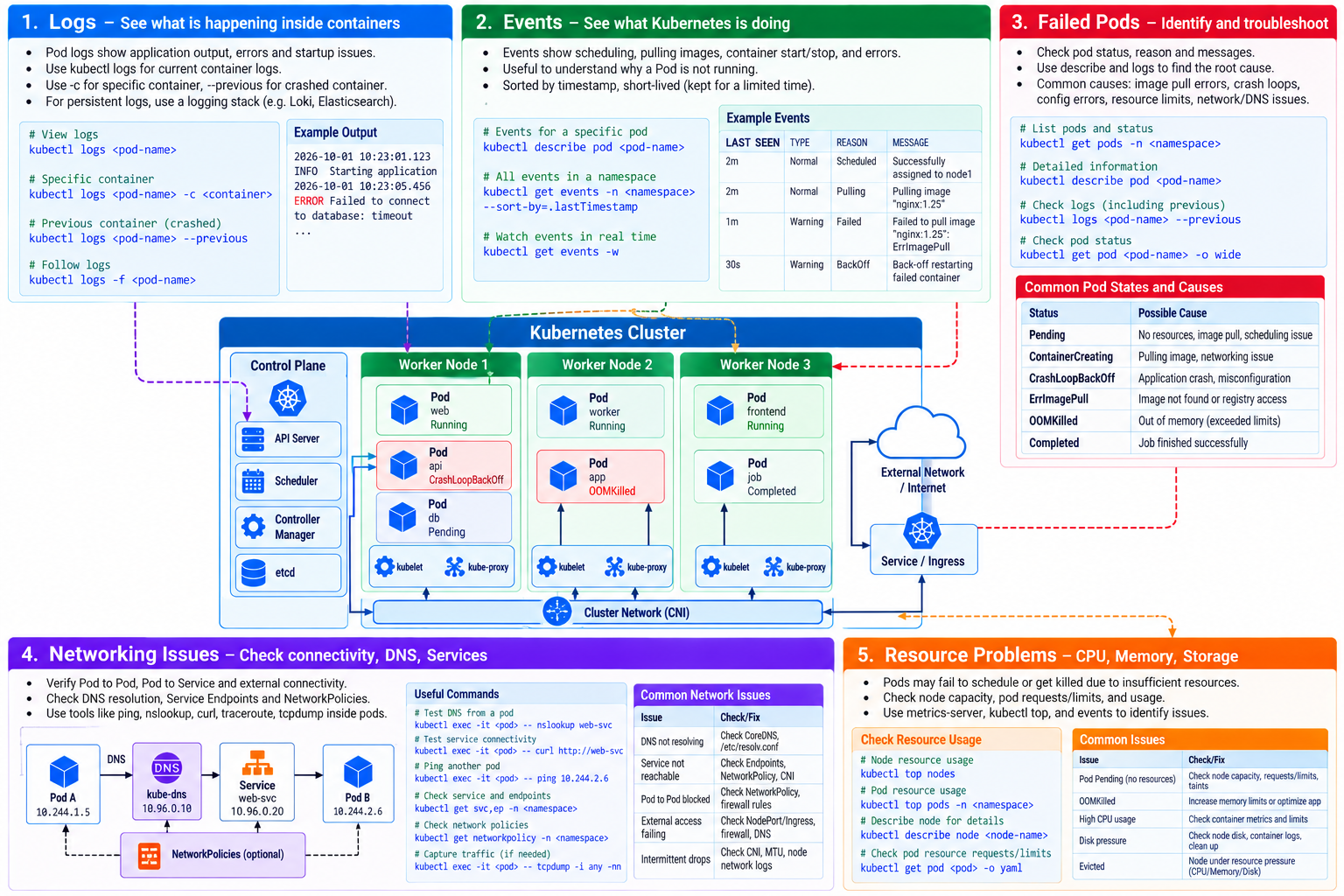
Useful commands:

12. HA + CKA Review: HA control plane, etcd, CRDs, backup/recovery, exam-style troubleshooting
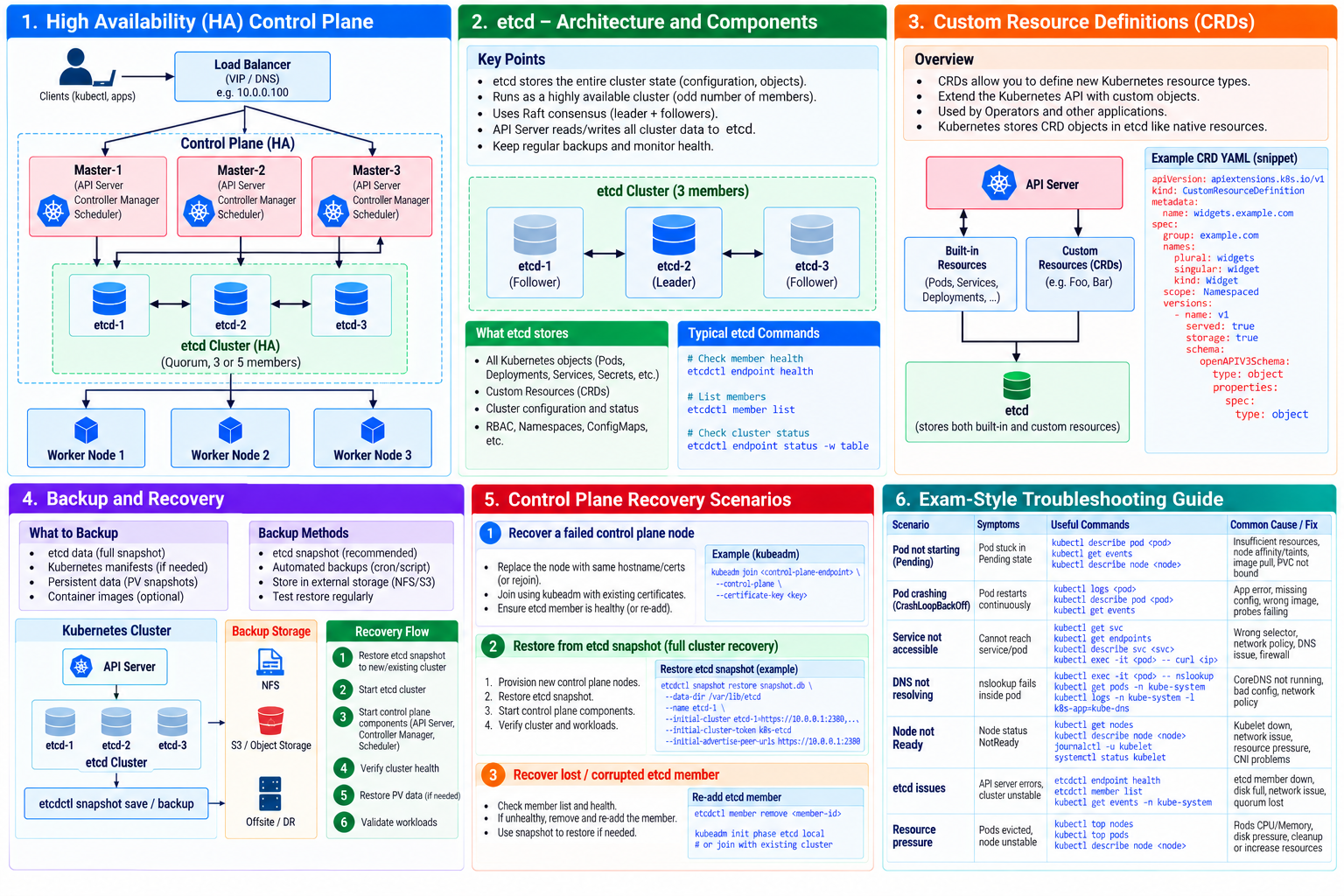
Useful commands:

Mixed troubleshooting lab + CKA-style exercises

Conclusion

Kubernetes simplifies the deployment, scaling, management, and operation of containerized applications reliably and efficiently.
Storage Types

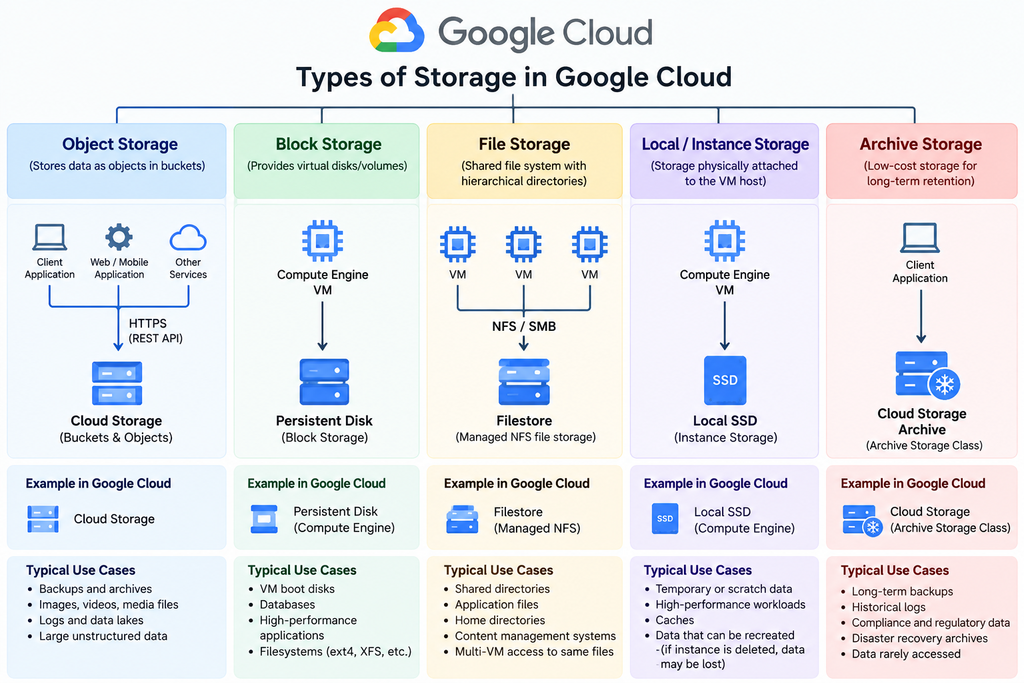
What is Storage?
Storage is the hardware or service used to save, retain, and retrieve digital data, either temporarily or permanently.

Main Storage Types

  • Block Storage – Data stored in fixed-size blocks; ideal for disks, VMs, and databases.
  • File Storage – Data organized as files and folders; commonly accessed through NFS or SMB.
  • Object Storage – Data stored as objects with metadata; ideal for backups, media, logs, and cloud-scale data.
  • Local/Ephemeral Storage – Fast storage attached to a server; often used for temporary data.
  • Archive Storage – Low-cost storage for long-term, rarely accessed data.

Different storage types provide different levels of performance, persistence, scalability, sharing, availability, and cost. Choosing the right type ensures applications get the required speed, reliability, data protection, and cost efficiency.

Kubernetes Storage Types

k8S OpenShift Architecture

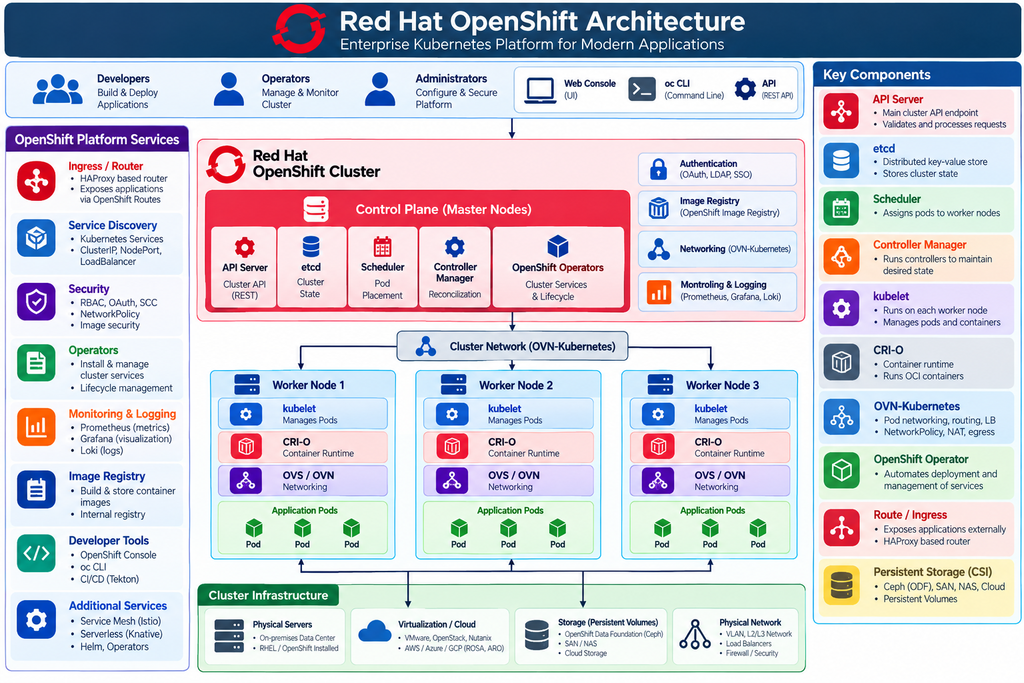
Red Hat OpenShift is an enterprise container platform built on Kubernetes. It provides an integrated environment for deploying, managing, scaling, and securing containerized applications across physical, virtual, and cloud infrastructure.

Main architectural components:

  • Control Plane – Manages the cluster through the API Server, etcd, Scheduler, Controller Manager, and OpenShift Operators.
  • Worker Nodes – Run application pods using kubelet and the CRI-O container runtime.
  • Networking – OVN-Kubernetes provides pod networking, routing, load balancing, NetworkPolicy, and ingress/egress connectivity.
  • Platform Services – Includes Routes/Ingress, authentication, image registry, monitoring, logging, Operators, and developer tools.
  • Storage – CSI-based persistent storage can integrate with Ceph/ODF, SAN, NAS, and cloud storage.
  • Infrastructure – OpenShift can run on bare metal, virtualization platforms, private clouds, and public clouds.

In simple terms:
OpenShift = Kubernetes + Networking + Security + Automation + Monitoring + Developer Tools.

k8S/Cilium eBPF – extended Berkeley Packet Filter

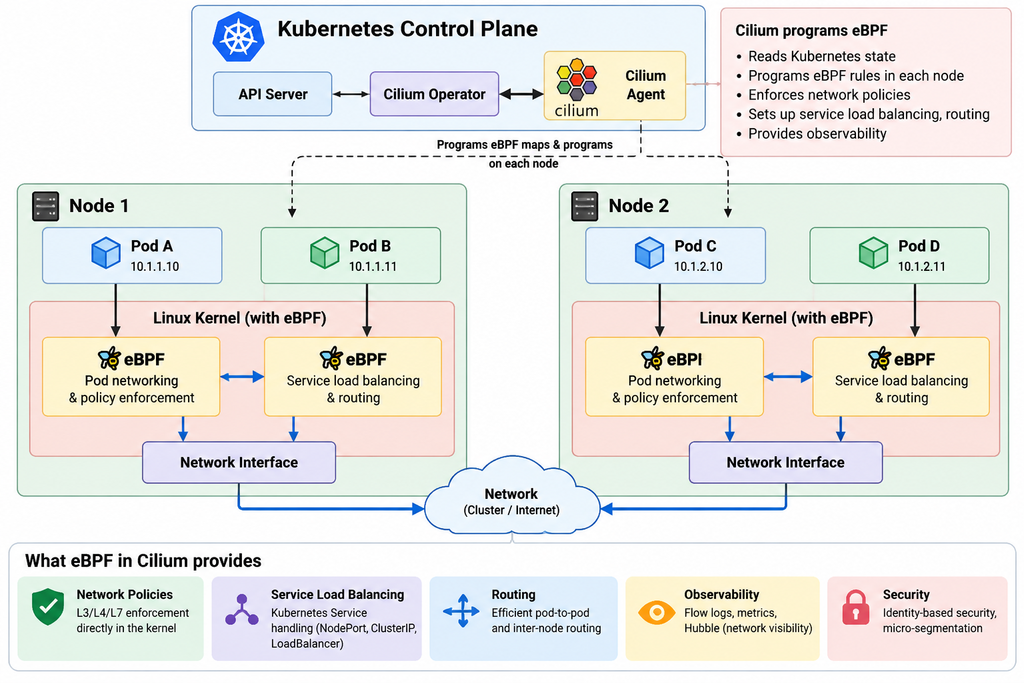
eBPF (extended Berkeley Packet Filter) is a Linux kernel technology that allows small, secure programs to run directly inside the kernel without modifying kernel source code.

In Cilium, eBPF is mainly used for:

  • High-performance networking between Kubernetes pods and nodes
  • Network policy & security enforcement
  • Service load balancing and routing
  • Traffic monitoring & observability with Hubble
  • Reducing or replacing traditional iptables-based packet processing

In short: eBPF gives Cilium a programmable, efficient way to control and observe network traffic directly inside the Linux kernel.

In simple terms:

Pod → eBPF (Cilium) → Network → eBPF → Pod

eBPF allows Cilium to provide things such as network policies, load balancing, routing, service handling, and network visibility, often without relying heavily on traditional iptables.

What is SD-WAN and Benefits

SD-WAN (Software-Defined Wide Area Network) is a modern approach to managing and optimizing wide area networks (WANs), allowing businesses to securely and efficiently connect remote offices, data centers, and cloud resources over the internet. Unlike traditional WANs, which rely on expensive, static MPLS (Multiprotocol Label Switching) circuits or leased lines, SD-WAN uses software to dynamically manage the traffic across multiple types of network connections, such as broadband internet, 4G/5G, MPLS, and other network types.

How SD-WAN Works:

Centralized Control Plane:

    • SD-WAN is built around a centralized control plane that manages the entire network’s policies and traffic routing.
    • This control plane is typically hosted in the cloud or on-premises, and it communicates with SD-WAN devices (also called edge devices or appliances) at branch offices, data centers, or remote sites.
    • The centralized control allows for real-time traffic management and decision-making, optimizing network performance across different types of connections.

    Decentralized Data Plane:

      • The data plane is made up of SD-WAN devices located at the edge of the network, such as branch routers, and it handles actual data forwarding and traffic routing.
      • These edge devices are responsible for securely transmitting data between remote sites, data centers, and cloud applications, based on the policies set by the control plane.

      Traffic Management and Routing:

        • SD-WAN uses intelligent path selection to route traffic over the most appropriate and cost-effective path in real-time. It can choose from multiple links (e.g., MPLS, broadband, LTE) based on:
          • Performance metrics: latency, jitter, packet loss, etc.
          • Application requirements: certain applications might need high bandwidth or low latency.
          • Policy-driven decisions: predefined rules about how specific types of traffic should be prioritized (e.g., voice or video traffic).

        Application-Aware Routing:

          • SD-WAN can distinguish between different types of applications and automatically route traffic based on business priorities.
          • For example, it can prioritize VoIP or video conferencing traffic over general web browsing traffic to ensure high-quality performance for critical applications.
          • It can also dynamically adjust traffic routes based on network conditions to maintain application performance.

          Security:

            • SD-WAN often includes integrated security features such as:
              • Encryption: All traffic between SD-WAN devices is encrypted, ensuring secure communication over potentially untrusted public networks (e.g., the internet).
              • Firewalling: Built-in firewall capabilities can prevent unauthorized access and attacks.
              • VPN (Virtual Private Network): Secure site-to-site connections can be established, leveraging IPsec or SSL VPNs.
              • Zero Trust Security: Many SD-WAN solutions implement Zero Trust principles, ensuring that security policies are enforced across the network regardless of location.

            Cloud Integration:

              • SD-WAN is well-suited for cloud-first or hybrid IT environments because it allows direct and optimized access to cloud applications (e.g., SaaS, IaaS, PaaS) without routing traffic through centralized data centers.
              • This reduces latency, improves application performance, and enhances user experience by enabling direct internet breakout from remote sites to cloud services.

              Simplified Management:

                • SD-WAN solutions are often managed through a centralized, web-based portal, providing administrators with visibility into the entire network.
                • The portal allows for easy configuration, monitoring, troubleshooting, and reporting across all remote sites and cloud applications.
                • Many SD-WAN platforms offer automation, allowing for the rapid deployment of new branch sites or network changes without requiring manual configuration at each site.

                Key Benefits of SD-WAN:

                Cost Efficiency:

                  • By leveraging lower-cost internet connections (such as broadband or LTE) alongside or in place of expensive MPLS links, organizations can reduce their WAN costs significantly.

                  Improved Performance:

                    • SD-WAN can provide better application performance by selecting the best path based on real-time network conditions, reducing bottlenecks and improving the user experience.

                    Scalability:

                      • SD-WAN networks are easier to scale as businesses grow. New sites can be added quickly without the need for complex configurations or additional hardware.

                      Flexibility:

                        • SD-WAN can support multiple types of connections (e.g., MPLS, broadband, LTE, 5G), making it adaptable to a wide range of network environments.

                        Security:

                          • SD-WAN provides built-in encryption and secure connections, reducing the need for separate security appliances.

                          Cloud Optimization:

                            • SD-WAN helps businesses securely and efficiently connect to cloud applications and services without backhauling traffic through a central data center.

                            Centralized Control and Visibility:

                              • The centralized control plane gives IT teams a unified view of the network, simplifying management and troubleshooting.

                              Use Cases for SD-WAN:

                              1. Branch Office Connectivity: Connecting multiple branch offices securely and efficiently, with optimized performance for cloud applications.
                              2. Cloud Transformation: Ensuring seamless, secure access to cloud resources and applications for remote and branch locations.
                              3. Business Continuity: Using multiple network links to ensure high availability and failover in case of a link or site failure.
                              4. Remote Worker Access: Extending SD-WAN benefits to remote workers by securely connecting them to corporate applications via the internet.

                              Conclusion:

                              SD-WAN is revolutionizing the way organizations manage their WANs by using software to dynamically manage traffic, optimize application performance, and reduce costs. It provides a more flexible, secure, and efficient solution compared to traditional WAN architectures, making it particularly well-suited for modern cloud-driven, distributed enterprise environments.