Storage Types

What is Storage?
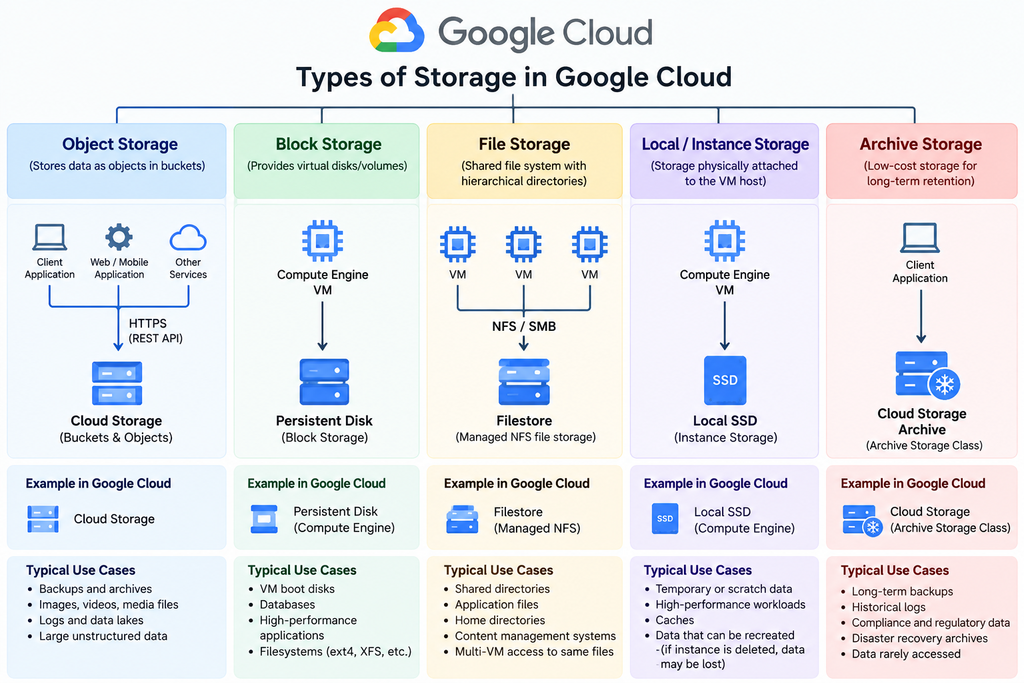
Storage is the hardware or service used to save, retain, and retrieve digital data, either temporarily or permanently.

Main Storage Types

  • Block Storage – Data stored in fixed-size blocks; ideal for disks, VMs, and databases.
  • File Storage – Data organized as files and folders; commonly accessed through NFS or SMB.
  • Object Storage – Data stored as objects with metadata; ideal for backups, media, logs, and cloud-scale data.
  • Local/Ephemeral Storage – Fast storage attached to a server; often used for temporary data.
  • Archive Storage – Low-cost storage for long-term, rarely accessed data.

Different storage types provide different levels of performance, persistence, scalability, sharing, availability, and cost. Choosing the right type ensures applications get the required speed, reliability, data protection, and cost efficiency.

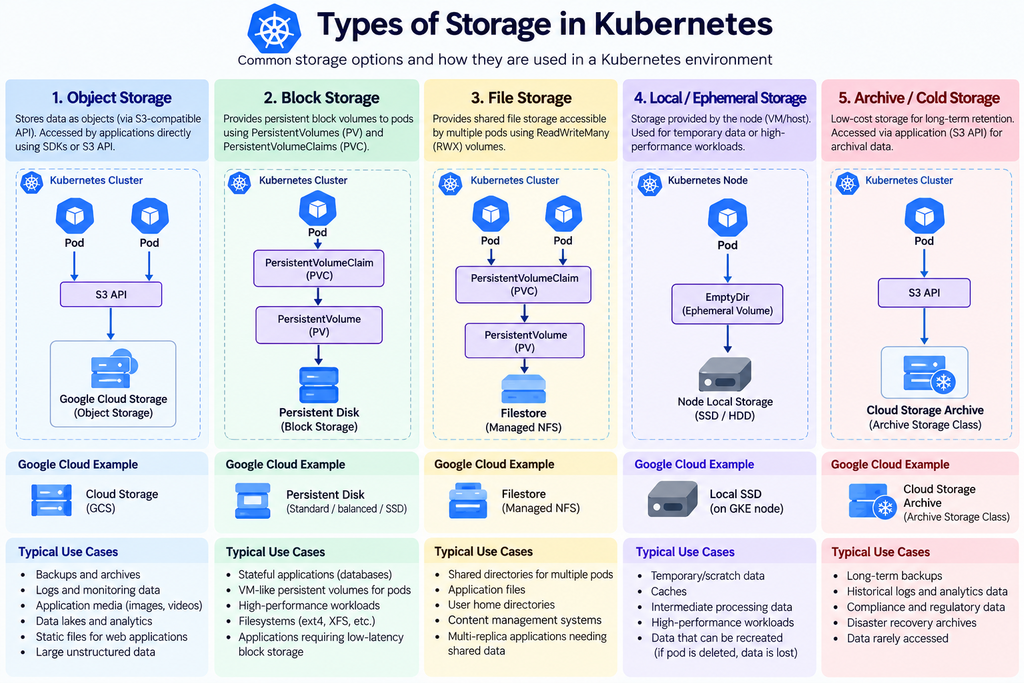
Kubernetes Storage Types

k8S OpenShift Architecture

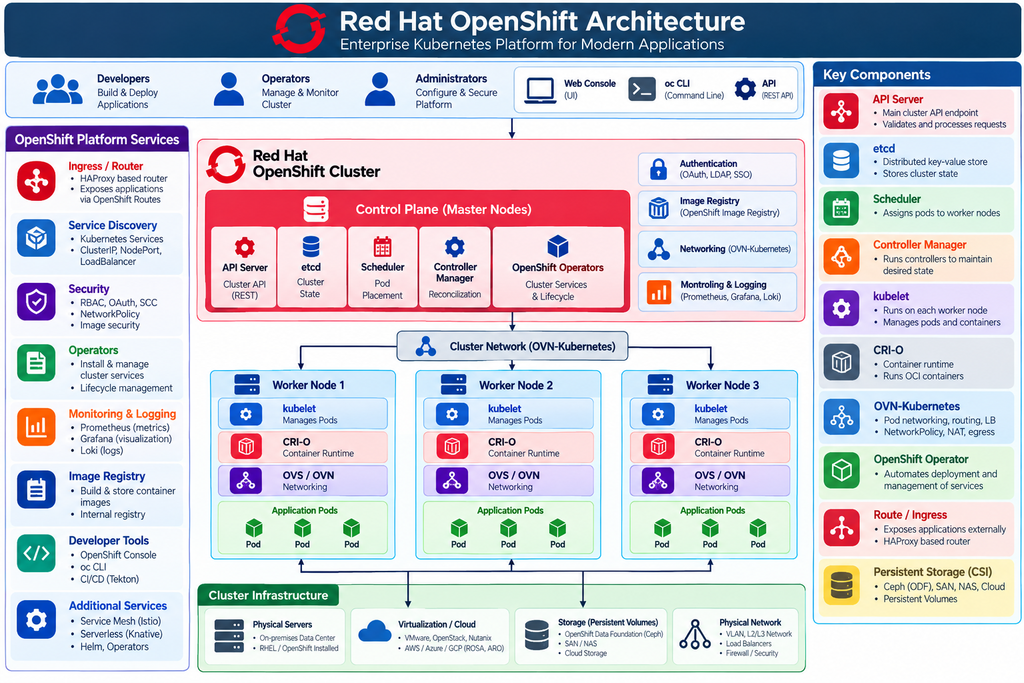
Red Hat OpenShift is an enterprise container platform built on Kubernetes. It provides an integrated environment for deploying, managing, scaling, and securing containerized applications across physical, virtual, and cloud infrastructure.

Main architectural components:

  • Control Plane – Manages the cluster through the API Server, etcd, Scheduler, Controller Manager, and OpenShift Operators.
  • Worker Nodes – Run application pods using kubelet and the CRI-O container runtime.
  • Networking – OVN-Kubernetes provides pod networking, routing, load balancing, NetworkPolicy, and ingress/egress connectivity.
  • Platform Services – Includes Routes/Ingress, authentication, image registry, monitoring, logging, Operators, and developer tools.
  • Storage – CSI-based persistent storage can integrate with Ceph/ODF, SAN, NAS, and cloud storage.
  • Infrastructure – OpenShift can run on bare metal, virtualization platforms, private clouds, and public clouds.

In simple terms:
OpenShift = Kubernetes + Networking + Security + Automation + Monitoring + Developer Tools.

k8S/Cilium eBPF – extended Berkeley Packet Filter

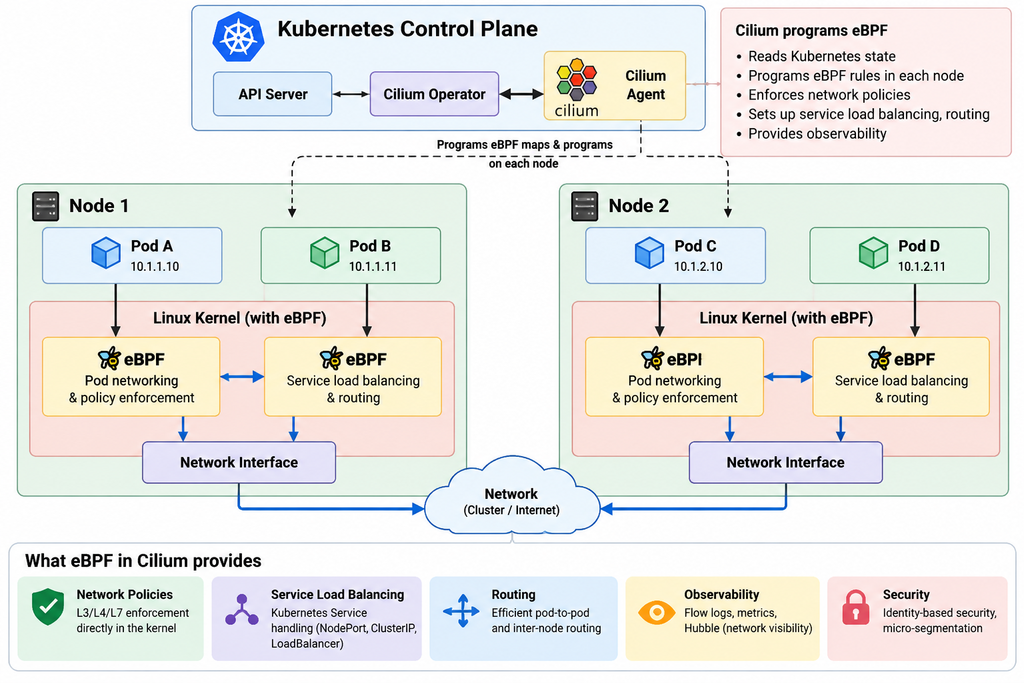
eBPF (extended Berkeley Packet Filter) is a Linux kernel technology that allows small, secure programs to run directly inside the kernel without modifying kernel source code.

In Cilium, eBPF is mainly used for:

  • High-performance networking between Kubernetes pods and nodes
  • Network policy & security enforcement
  • Service load balancing and routing
  • Traffic monitoring & observability with Hubble
  • Reducing or replacing traditional iptables-based packet processing

In short: eBPF gives Cilium a programmable, efficient way to control and observe network traffic directly inside the Linux kernel.

In simple terms:

Pod → eBPF (Cilium) → Network → eBPF → Pod

eBPF allows Cilium to provide things such as network policies, load balancing, routing, service handling, and network visibility, often without relying heavily on traditional iptables.

Cilium – CNI for Kubernetes

What is Cilium?
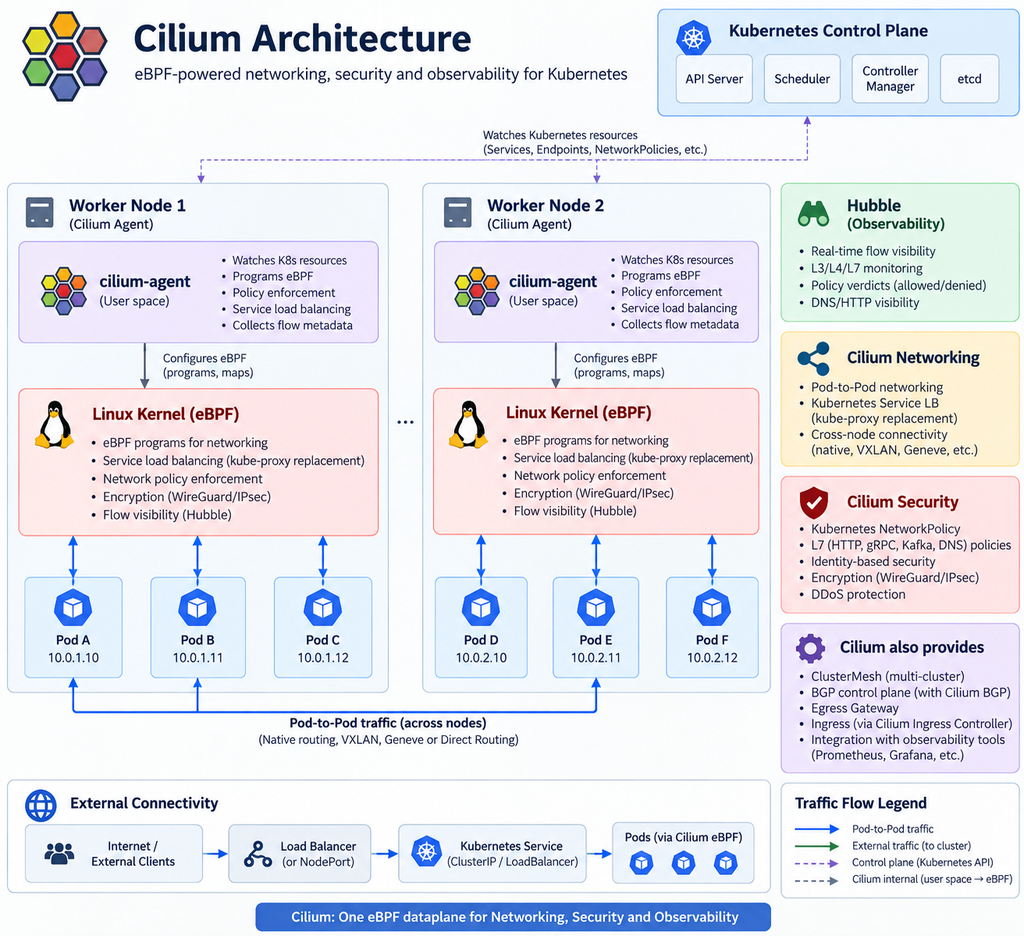
Cilium is an open-source CNI (Container Network Interface) for Kubernetes. It uses Linux eBPF technology to provide high-performance networking, security, load balancing, and observability.

Where is it used?
Cilium is commonly used in Kubernetes environments for Pod-to-Pod networking, NetworkPolicy enforcement, Service load balancing, multi-cluster connectivity, and network monitoring. It is especially useful in large-scale cloud-native environments where performance, security, and visibility are important.

Key features: eBPF-based networking, L3/L4/L7 security policies, kube-proxy replacement, encryption with WireGuard/IPsec, and network observability through Hubble.

Alternatives: Calico is a popular feature-rich CNI with strong network-policy capabilities; Flannel is a simpler option mainly focused on Pod networking; Antrea is a Kubernetes-native networking and security solution based on Open vSwitch; and Kube-router provides networking and policy with a relatively lightweight architecture.

In short:
Cilium = Kubernetes networking + security + observability, powered by eBPF.

Sunday Kubernetes learning plan

Based on the LFS258 topics, here is a 12-week Sunday Kubernetes Fundamentals learning plan. I’ve arranged it so each week builds on the previous one and includes theory, commands, a diagram topic, and a practical lab.

WeekMain TopicKey Things to LearnCommands / Lab Focus
1Kubernetes FoundationsContainers vs Kubernetes, cluster concepts, control plane vs worker nodeskubectl version, kubectl cluster-info, kubectl get nodes
2Kubernetes ArchitectureAPI Server, Scheduler, Controller Manager, etcd, kubelet, kube-proxykubectl get pods -A, kubectl describe node
3Cluster Installationkubeadm, kubelet, kubectl, container runtime, cluster bootstrapkubeadm init, kubeadm join, kubectl get nodes
4Pods & API ObjectsPods, YAML, namespaces, labels, annotationskubectl run, kubectl get pod, kubectl describe, kubectl apply -f
5Deployments & WorkloadsReplicaSets, Deployments, scaling, rolling updates, rollbackkubectl create deployment, kubectl scale, kubectl rollout
6Services & NetworkingClusterIP, NodePort, service discovery, DNS, pod networkingkubectl expose, kubectl get svc, kubectl get endpoints
7Ingress & GatewayIngress Controller, HTTP routing, Gateway APICreate an Ingress and route traffic to two Services
8Kubernetes StorageVolumes, PV, PVC, StorageClass, CSI, Ceph integrationkubectl get pv,pvc,sc, create PVC and mount into a Pod
9Helm & KustomizePackage management, Helm charts, templating, overlayshelm install, helm list, helm upgrade, kubectl apply -k
10Scheduling & SecurityScheduler, affinity, taints/tolerations, RBAC, ServiceAccountskubectl taint, kubectl auth can-i, kubectl create role
11Troubleshooting & LoggingLogs, events, failed Pods, networking, resource problemskubectl logs, kubectl events, kubectl exec, kubectl top
12HA + CKA ReviewHA control plane, etcd, CRDs, backup/recovery, exam-style troubleshootingMixed troubleshooting lab + CKA-style exercises

Week 1 — Kubernetes Foundations

Start with the overall picture:

Application → Container → Pod → Worker Node → Kubernetes Cluster

Cover why Kubernetes exists, what problems it solves, Kubernetes vs Docker/Podman, clusters, nodes, Pods, and the basic declarative model.

Practice:

kubectl version
kubectl cluster-info
kubectl get nodes
kubectl get nodes -o wide
kubectl get pods -A

Diagram: Kubernetes high-level architecture.

Lab: Connect kubectl to a cluster and identify the control-plane and worker nodes.


Week 2 — Kubernetes Architecture

Study the components in more detail:

              Kubernetes Cluster

          +----------------------+
          |    Control Plane     |
          |----------------------|
          | kube-apiserver       |
          | scheduler            |
          | controller-manager   |
          | etcd                 |
          +----------+-----------+
                     |
        -----------------------------
        |                           |
+-------v-------+           +-------v-------+
| Worker Node 1 |           | Worker Node 2 |
|---------------|           |---------------|
| kubelet       |           | kubelet       |
| kube-proxy    |           | kube-proxy    |
| containerd    |           | containerd    |
| Pods          |           | Pods          |
+---------------+           +---------------+

Useful commands:

kubectl get pods -n kube-system
kubectl describe node <node-name>
kubectl get componentstatuses
kubectl get --raw='/readyz?verbose'

Lab: Identify which Kubernetes component performs scheduling, stores cluster state, communicates with nodes, and maintains desired state.


Week 3 — Building a Cluster

Learn how the pieces are installed:

Linux → containerd → kubelet → kubeadm → Kubernetes

Core commands:

sudo kubeadm init

Configure kubectl:

mkdir -p $HOME/.kube
sudo cp /etc/kubernetes/admin.conf $HOME/.kube/config
sudo chown $(id -u):$(id -g) $HOME/.kube/config

Worker:

sudo kubeadm join <control-plane-ip>:6443 \
  --token <token> \
  --discovery-token-ca-cert-hash sha256:<hash>

Lab: Build a small cluster or walk through a kubeadm deployment.


Week 4 — Pods and Kubernetes API Objects

Learn the most important Kubernetes object first: the Pod.

Example:

apiVersion: v1
kind: Pod
metadata:
  name: nginx
  labels:
    app: web
spec:
  containers:
    - name: nginx
      image: nginx

Run:

kubectl apply -f nginx.yaml
kubectl get pods
kubectl get pods -o wide
kubectl describe pod nginx
kubectl logs nginx

Also cover:

kubectl get namespaces
kubectl get pods -n kube-system
kubectl get pods --show-labels

Diagram: Pod → Container relationship.

Lab: Create two Pods using YAML and labels.


Week 5 — Deployments, ReplicaSets and Workloads

The relationship to understand is:

Deployment
    |
    v
ReplicaSet
    |
    v
+-----+ +-----+ +-----+
| Pod | | Pod | | Pod |
+-----+ +-----+ +-----+

Commands:

kubectl create deployment nginx --image=nginx
kubectl get deployments
kubectl get rs
kubectl get pods

Scale:

kubectl scale deployment nginx --replicas=4

Upgrade:

kubectl set image deployment/nginx nginx=nginx:1.27

Check:

kubectl rollout status deployment/nginx
kubectl rollout history deployment/nginx

Rollback:

kubectl rollout undo deployment/nginx

Lab: Deploy nginx, scale it, upgrade it, then roll it back.


Week 6 — Kubernetes Networking & Services

This is one of the most important Kubernetes topics.

Understand:

          Service
       10.96.10.20
            |
    -----------------
    |       |       |
   Pod     Pod     Pod
10.1.1.2 10.1.2.3 10.1.3.4

Study:

Pod IP → Service → ClusterIP → NodePort → external access

Commands:

kubectl expose deployment nginx \
  --port=80 \
  --type=ClusterIP

kubectl get svc
kubectl describe svc nginx
kubectl get endpoints

NodePort:

kubectl expose deployment nginx \
  --name=nginx-nodeport \
  --port=80 \
  --type=NodePort

Lab: Access an application first through Pod IP, then ClusterIP, then NodePort.


Week 7 — Ingress and Gateway API

Architecture:

Internet
   |
   v
Ingress / Gateway
   |
   +----------------+
   |                |
   v                v
Service A        Service B
   |                |
 Pods             Pods

Learn host/path routing such as:

example.com/app1 → service-app1
example.com/app2 → service-app2

Commands:

kubectl get ingress
kubectl describe ingress

Lab: Deploy two applications and route /app1 and /app2 to different Services.


Week 8 — Storage, PV, PVC, CSI and Ceph

This week connects directly to the Ceph diagrams we discussed.

Understand:

Application Pod
      |
      v
     PVC
      |
      v
      PV
      |
      v
 StorageClass
      |
      v
  CSI Driver
      |
      v
     Ceph

Commands:

kubectl get pv
kubectl get pvc
kubectl get storageclass
kubectl describe pvc <pvc-name>

Example PVC:

apiVersion: v1
kind: PersistentVolumeClaim
metadata:
  name: app-data
spec:
  accessModes:
    - ReadWriteOnce
  resources:
    requests:
      storage: 5Gi

Lab: Create a PVC, attach it to a Pod, write data, delete/recreate the Pod, and verify that the data remains.


Week 9 — Helm & Kustomize

Learn why manually maintaining dozens of YAML files becomes difficult.

Helm:

helm repo add bitnami https://charts.bitnami.com/bitnami
helm repo update

helm install my-nginx bitnami/nginx
helm list
helm upgrade my-nginx bitnami/nginx
helm uninstall my-nginx

Kustomize:

kubectl apply -k .

Concept:

Base YAML
   |
   +---- Dev Overlay
   |
   +---- Test Overlay
   |
   +---- Production Overlay

Lab: Install an application with Helm and modify another application using Kustomize.


Week 10 — Scheduling and Security

Scheduling:

Pod
 |
Scheduler
 |
 +---- Node A
 +---- Node B
 +---- Node C

Study:

requests/limits, nodeSelector, affinity, anti-affinity, taints and tolerations.

Commands:

kubectl describe node
kubectl get pods -o wide

kubectl taint nodes worker1 dedicated=test:NoSchedule

Security topics:

User → Role → RoleBinding → Resource

Commands:

kubectl auth can-i get pods
kubectl auth can-i delete pods

kubectl create serviceaccount app-user

Lab: Restrict a ServiceAccount so it can read Pods but cannot delete them.


Week 11 — Troubleshooting

This should be one of the most practical sessions.

Use a troubleshooting sequence:

Application issue
       |
       v
kubectl get pods
       |
       v
kubectl describe
       |
       v
kubectl logs
       |
       v
Events / Service / DNS
       |
       v
Node / kubelet

Core commands:

kubectl get pods -A
kubectl get events --sort-by=.metadata.creationTimestamp

kubectl describe pod <pod>
kubectl logs <pod>
kubectl logs <pod> --previous

kubectl exec -it <pod> -- /bin/sh

kubectl top pods
kubectl top nodes

Also practice:

journalctl -u kubelet

Lab: Intentionally create:

  • Wrong container image
  • Wrong Service selector
  • Incorrect port
  • Failed readiness probe
  • Unschedulable Pod

Then diagnose each one.


Week 12 — High Availability + CKA Review

Finish with production Kubernetes architecture:

             Load Balancer
                  |
        ---------------------
        |         |         |
       CP1       CP2       CP3
        |         |         |
        ------- etcd -------
                  |
       ---------------------
       |         |         |
     Worker1   Worker2   Worker3

Study:

HA control plane, etcd backup/restore, CRDs, node maintenance, application recovery, cluster troubleshooting.

Useful operations:

kubectl cordon worker1
kubectl drain worker1 --ignore-daemonsets
kubectl uncordon worker1

Review:

kubectl get nodes
kubectl get pods -A
kubectl get svc
kubectl get ingress
kubectl get pv,pvc
kubectl get roles,rolebindings

Finish with a practical challenge: deploy an application with Deployment → Service → Ingress → PVC, intentionally introduce two faults, then troubleshoot them.

Recommended Sunday session structure

Since you already have a regular Kubernetes & Cloud Native learning session, a compact format can work well:

10 min — Concept → 5 min — Architecture diagram → 10 min — commands/demo → 5 min — troubleshooting/question

For deeper personal study, spend another 60–90 minutes during the week reproducing the lab yourself. The biggest improvement will come from typing the commands rather than only reading them.

After these 12 weeks, the natural next step is CKA-focused practice, especially timed exercises around troubleshooting, networking, storage, scheduling, RBAC, cluster maintenance, and kubectl speed.

CEPH – An open source distributed storage platform

Ceph is not an acronym, so there is no official expansion like “C.E.P.H.”

The name Ceph comes from “cephalopod”—animals such as an octopus or squid. The idea fits Ceph because it can spread and manage data across many storage nodes, somewhat like many arms working together.

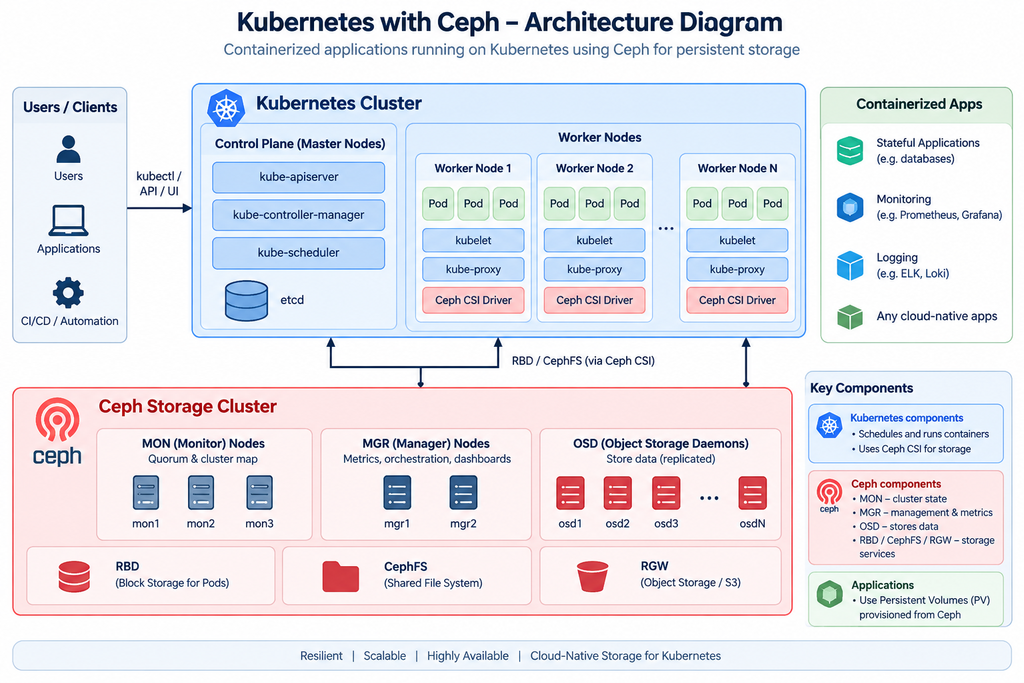
Kubernetes handles container orchestration, scheduling, networking, and application lifecycle management, while Ceph provides the storage layer. Ceph MON, MGR, and OSD components work together to maintain cluster health, manage the storage environment, replicate data, and provide resilient persistent storage to Kubernetes applications.

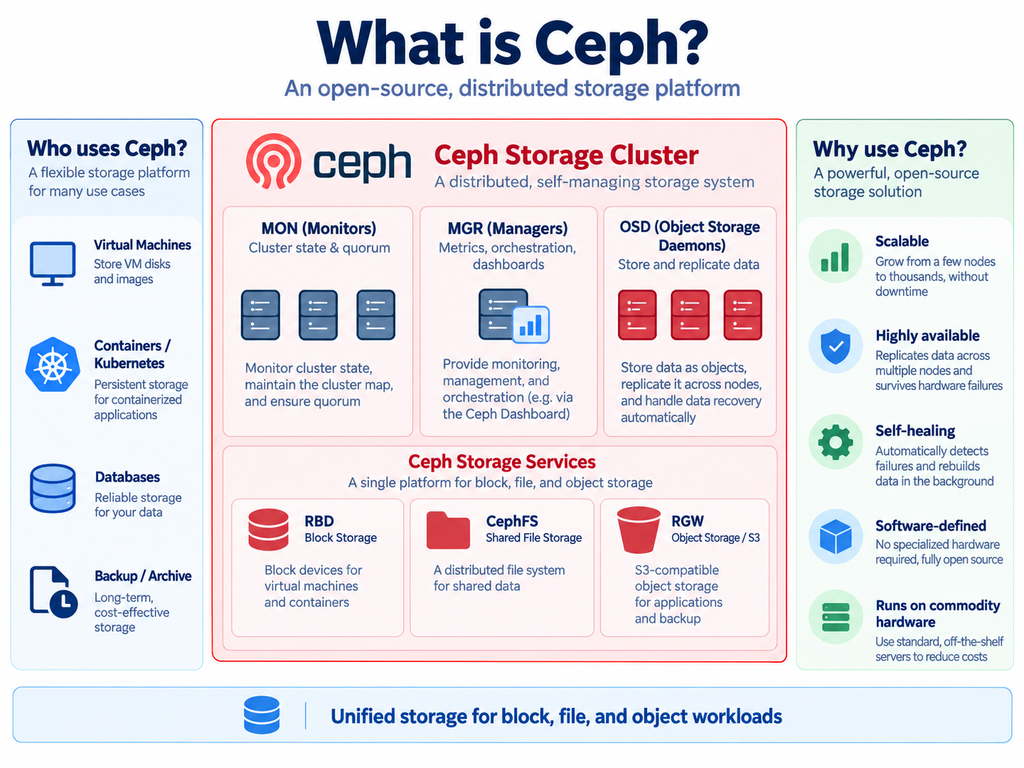
Ceph combines multiple storage servers into one distributed storage platform. It can provide RBD block storage for virtual machines and Kubernetes, CephFS for shared file storage, and RGW for S3-compatible object storage. Because data is distributed and replicated across multiple OSDs, Ceph can automatically recover from disk or server failures while keeping applications running.

Kubernetes and Ceph provide a scalable, highly available, cloud-native platform for running stateful applications such as databases, monitoring systems, logging platforms, and other enterprise workloads.

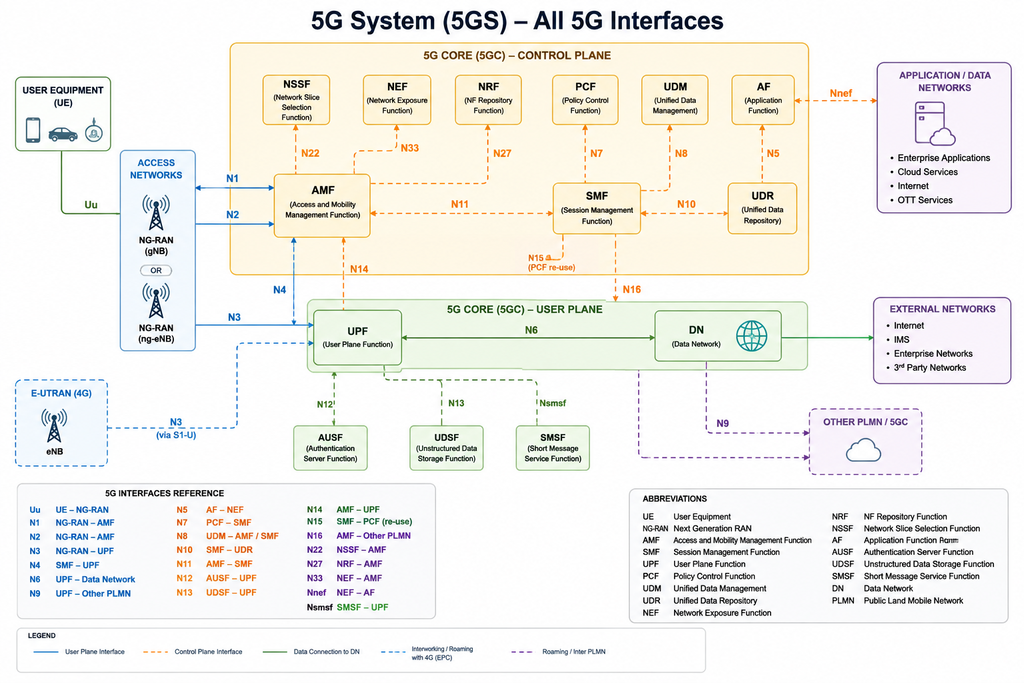
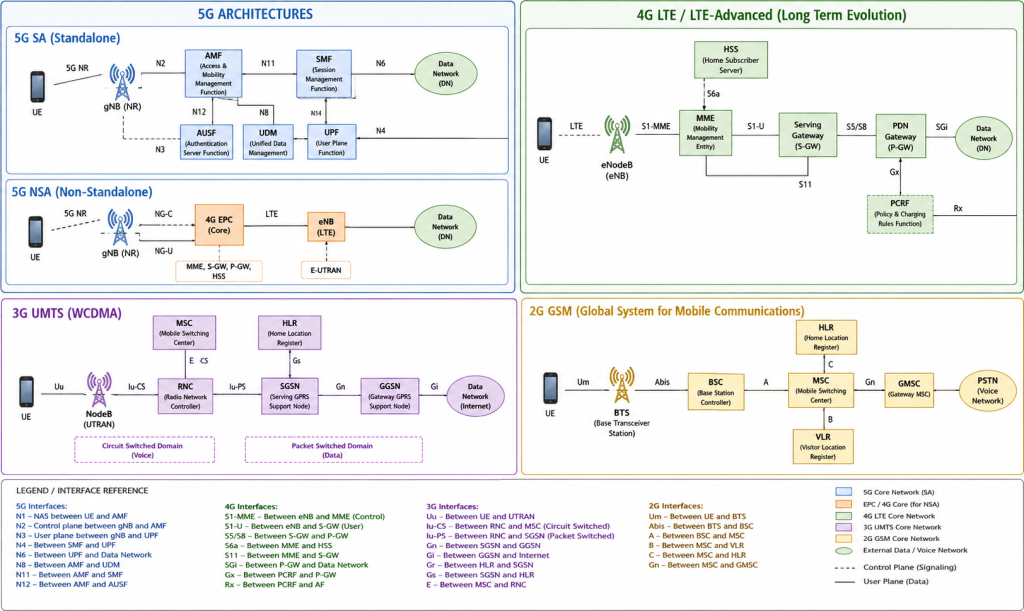
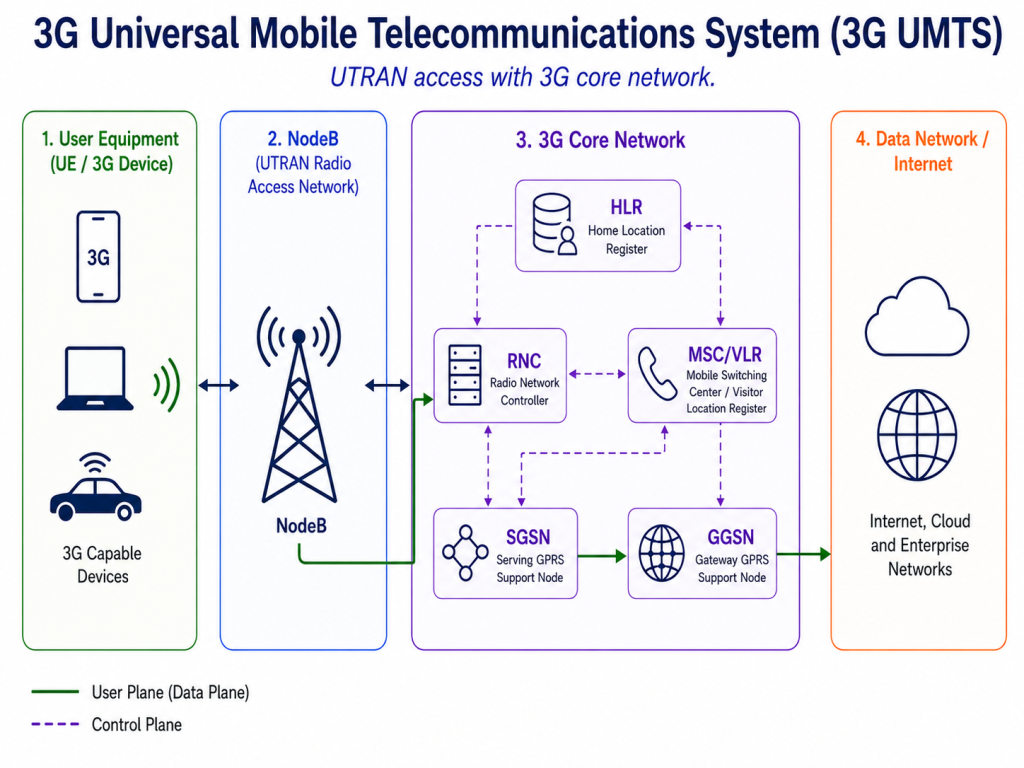
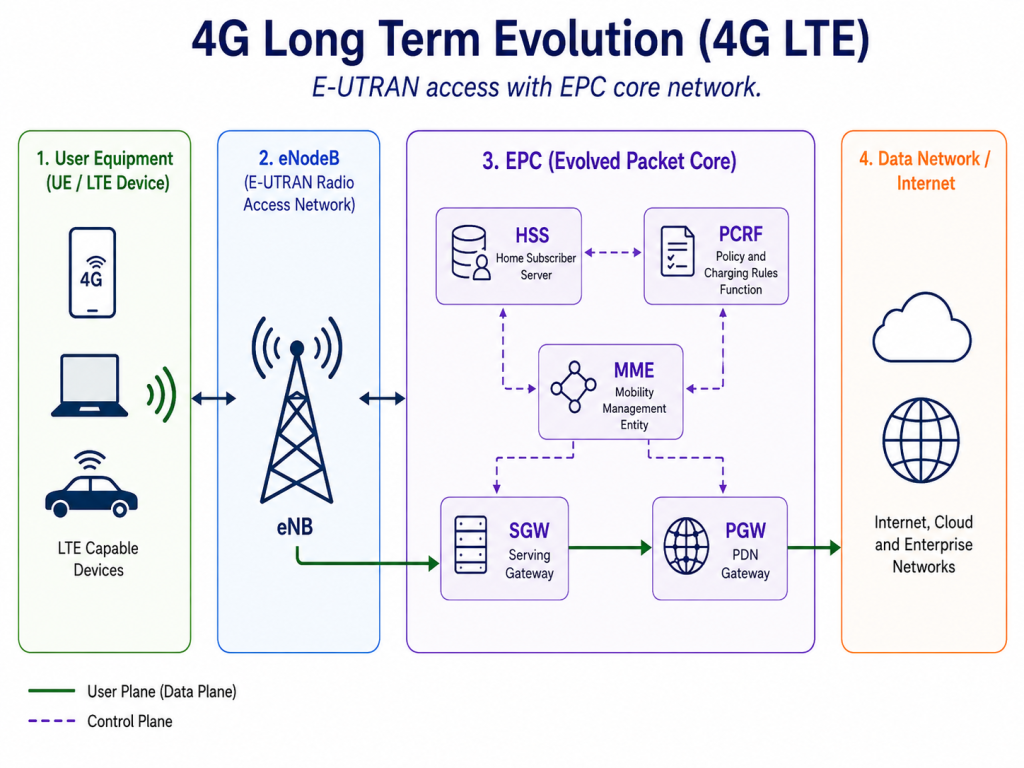
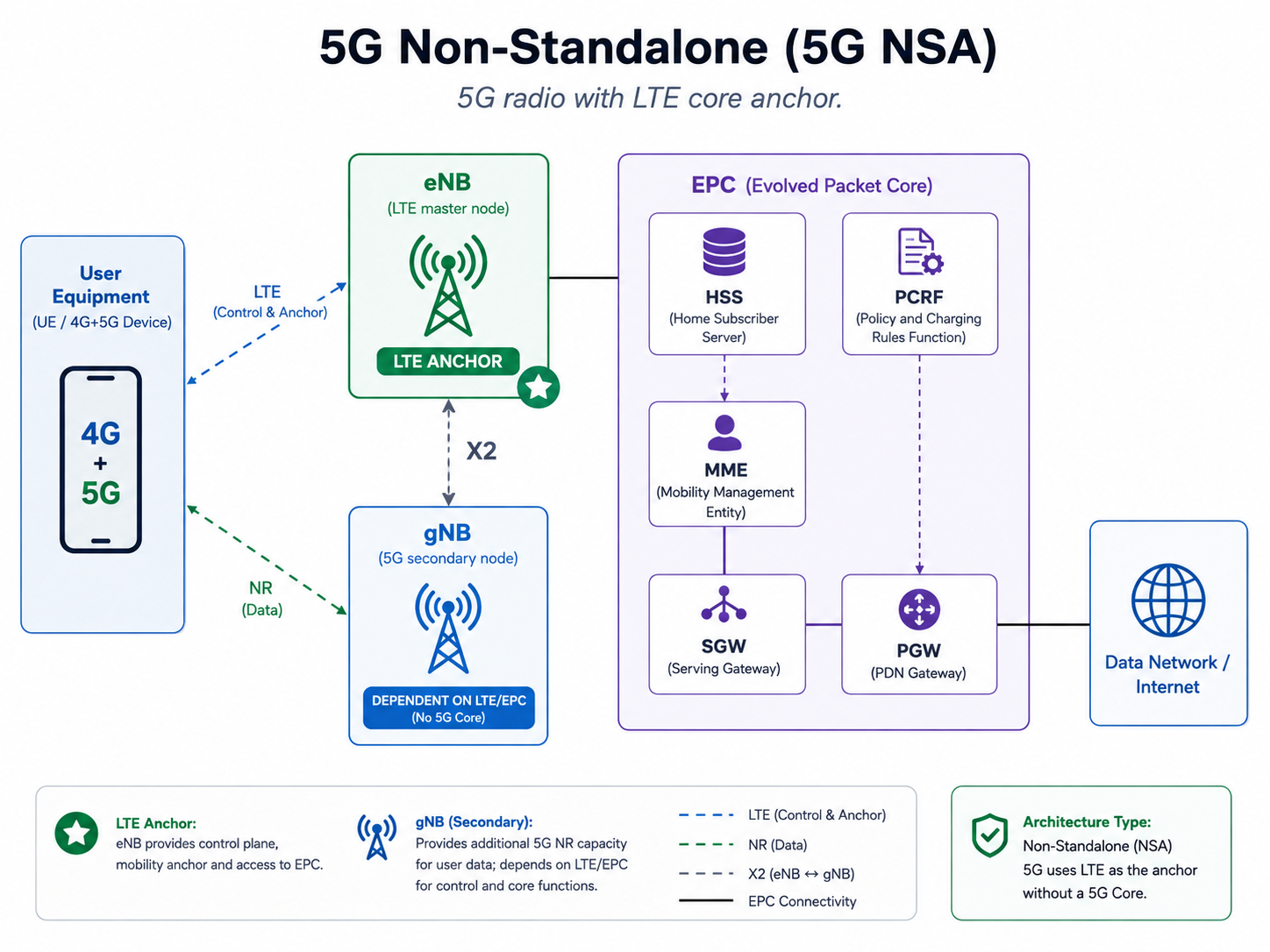
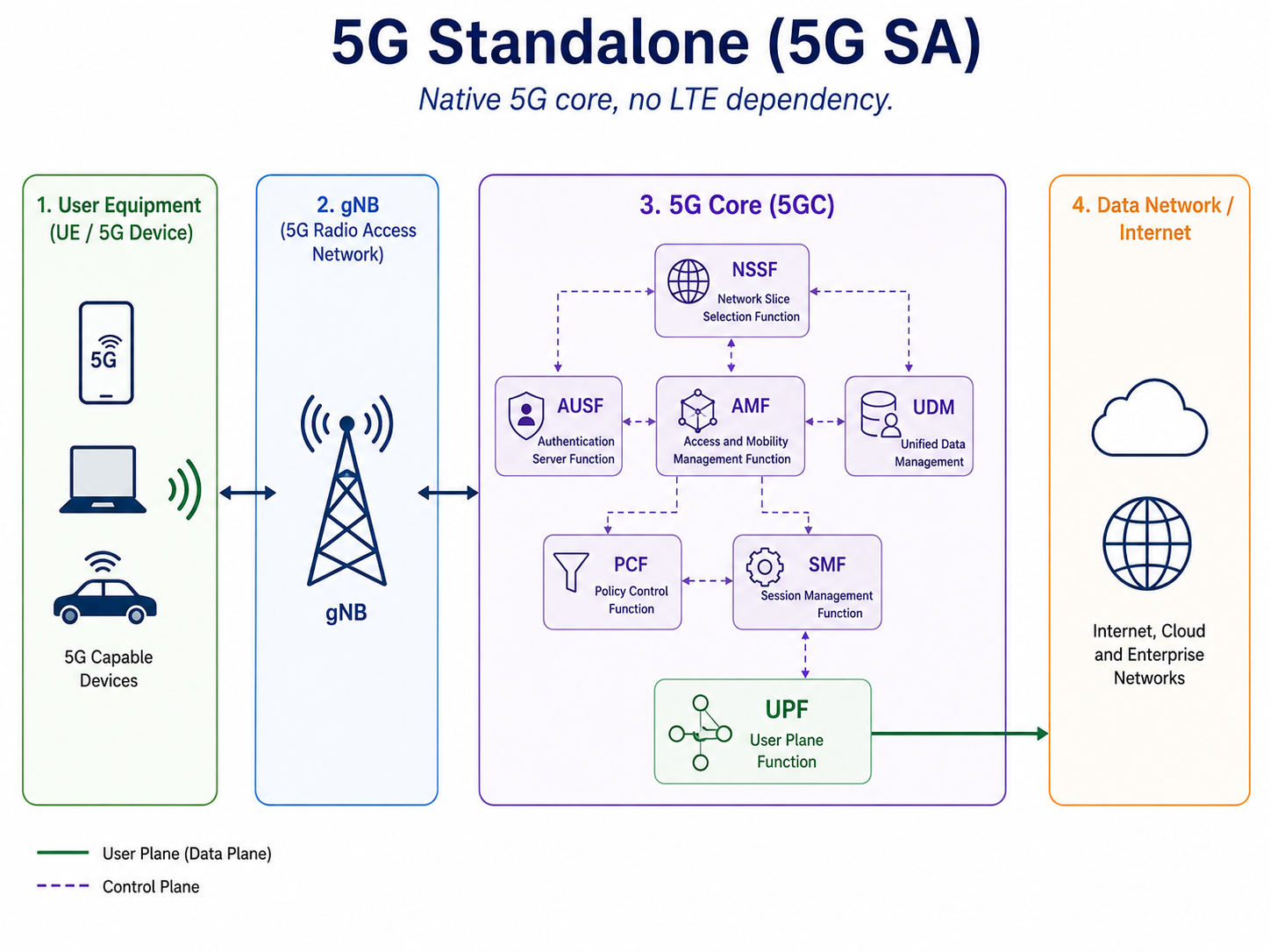
5G System (5GS) architecture

This diagram provides a high-level overview of the 5G System (5GS) architecture and its key interfaces. It shows how the User Equipment (UE), NG-RAN, 5G Core control-plane functions, user-plane functions, and external data networks communicate with each other.

The main interfaces include N1/N2 for UE and RAN signaling, N3/N4/N6 for user-plane traffic, and service-based interfaces such as N5, N7, N8, N10, N11, N22, N27, and N33 between 5G Core network functions. It also highlights 4G EPC interworking, roaming/inter-PLMN connectivity, and access to external application and data networks.