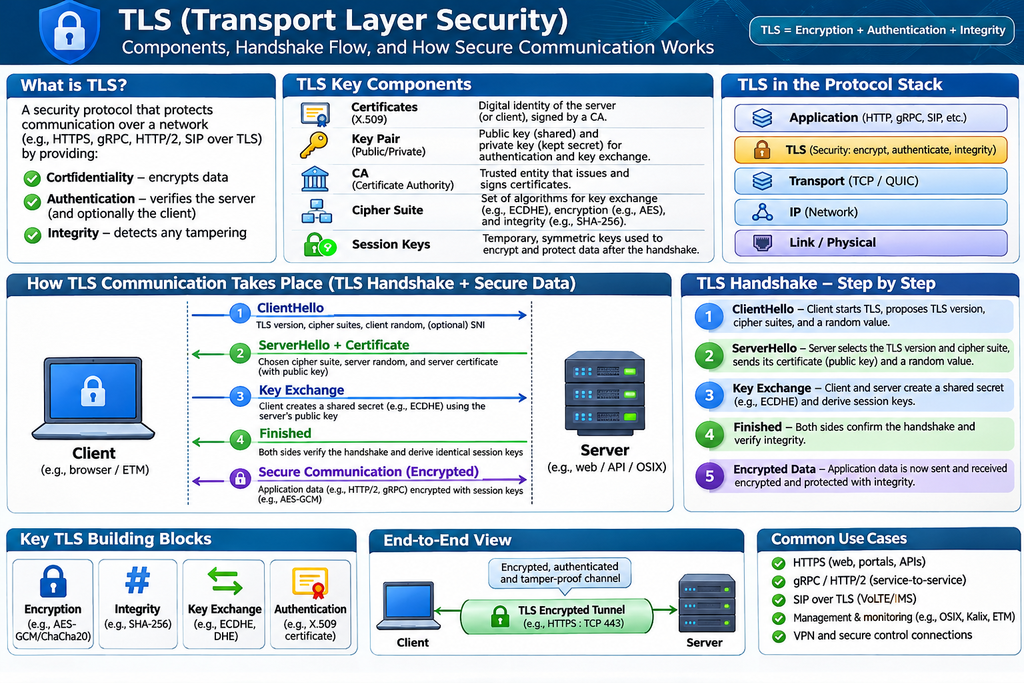
One slide :: HL on TLS
Reply

Lab Environment:
Task 1: Explore Kubernetes Workloads
Objective: Identify Deployments, ReplicaSets, StatefulSets, DaemonSets, Jobs and CronJobs.
kubectl get all -A
kubectl get deployments -A
kubectl get replicasets -A
kubectl get statefulsets -A
kubectl get daemonsets -A
kubectl get jobs,cronjobs -A
kubectl explain deployment
kubectl explain deployment.spec
Exercise: Explain the difference between Deployment, StatefulSet, DaemonSet and Job.
Task 2: Create and Manage Deployments
Objective: Deploy Nginx and manage application replicas.
kubectl create namespace cka-unit2
kubectl create deployment nginx –image=nginx:stable –replicas=3 -n cka-unit2
kubectl get deployments -n cka-unit2
kubectl get pods -n cka-unit2 -o wide
kubectl get rs -n cka-unit2
kubectl describe deployment nginx -n cka-unit2
kubectl scale deployment nginx –replicas=5 -n cka-unit2
kubectl get pods -n cka-unit2
Expected: Five Nginx Pods running under one Deployment.
Exercise: Scale the Deployment down to two replicas.
Task 3: Rolling Updates and Rollbacks
Objective: Update application images and restore previous versions.
kubectl set image deployment/nginx nginx=nginx:alpine -n cka-unit2
kubectl rollout status deployment/nginx -n cka-unit2
kubectl rollout history deployment/nginx -n cka-unit2
kubectl rollout undo deployment/nginx -n cka-unit2
kubectl rollout restart deployment/nginx -n cka-unit2
kubectl get deployment nginx -n cka-unit2 -o jsonpath='{.spec.template.spec.containers[*].image}’
Exercise: Deploy an invalid image, identify the failure and roll back.
Task 4: Deployment Strategies and Resource Management
Objective: Configure CPU, memory and rolling-update parameters.
kubectl set resources deployment nginx –requests=cpu=100m,memory=64Mi –limits=cpu=500m,memory=256Mi -n cka-unit2
kubectl describe deployment nginx -n cka-unit2
kubectl top pods -n cka-unit2
kubectl patch deployment nginx -n cka-unit2 –type=strategic -p ‘{“spec”:{“strategy”:{“type”:”RollingUpdate”,”rollingUpdate”:{“maxSurge”:1,”maxUnavailable”:0}}}}’
kubectl get deployment nginx -n cka-unit2 -o yaml
Exercise: Explain maxSurge, maxUnavailable, requests and limits.
Task 5: ConfigMaps and Secrets
Objective: Manage application configuration and sensitive values.
kubectl create configmap app-config –from-literal=APP_MODE=production -n cka-unit2
kubectl create secret generic app-secret –from-literal=DB_PASSWORD=test123 -n cka-unit2
kubectl get configmaps -n cka-unit2
kubectl get secrets -n cka-unit2
kubectl describe configmap app-config -n cka-unit2
kubectl describe secret app-secret -n cka-unit2
kubectl set env deployment/nginx –from=configmap/app-config -n cka-unit2
kubectl exec -n cka-unit2 deployment/nginx — printenv APP_MODE
Exercise: Create a ConfigMap containing two environment variables and verify them inside a Pod.
Task 6: Helm Package Manager
Objective: Install Kubernetes applications using Helm.
helm version
helm list -A
helm repo add bitnami https://charts.bitnami.com/bitnami
helm repo update
helm search repo nginx
helm show chart bitnami/nginx
helm show values bitnami/nginx
helm install webapp bitnami/nginx -n cka-unit2
helm list -n cka-unit2
helm status webapp -n cka-unit2
helm get manifest webapp -n cka-unit2
kubectl get pods,svc -n cka-unit2
Exercise: Identify the Helm release name, chart version and application version.
Note: Helm chart availability and container-image access may vary.
Task 7: Helm Upgrades and Rollbacks
Objective: Upgrade, inspect and restore Helm releases.
helm show values bitnami/nginx > values.yaml
helm get values webapp -n cka-unit2
helm upgrade webapp bitnami/nginx -n cka-unit2 –set service.type=ClusterIP
helm history webapp -n cka-unit2
helm rollback webapp 1 -n cka-unit2
helm status webapp -n cka-unit2
helm template webapp bitnami/nginx -n cka-unit2 > rendered.yaml
helm uninstall webapp -n cka-unit2
Exercise: Upgrade a Helm release and roll back to revision 1.
Task 8: Kubernetes Scheduling
Objective: Understand how the scheduler selects nodes.
kubectl get nodes -o wide
kubectl get pods -A -o wide
kubectl describe node k8sw1
kubectl describe node k8sw2
kubectl get nodes –show-labels
kubectl describe nodes | grep -A 8 ‘Allocated resources’
kubectl get pods -n kube-system -l component=kube-scheduler
kubectl logs -n kube-system kube-scheduler-k8sm –tail=50
kubectl get events -A –sort-by=.metadata.creationTimestamp
Exercise: Identify which worker nodes host the Nginx replicas and inspect their scheduling events.
Task 9: NodeSelector and Node Affinity
Objective: Schedule workloads onto specific nodes.
kubectl label node k8sw1 disktype=ssd
kubectl get nodes –show-labels
kubectl run node-test –image=nginx:stable -n cka-unit2 –dry-run=client -o yaml > node-test.yaml
Edit node-test.yaml and add under spec:
nodeSelector:
disktype: ssd
kubectl apply -f node-test.yaml
kubectl get pod node-test -n cka-unit2 -o wide
kubectl describe pod node-test -n cka-unit2
Exercise: Configure required node affinity for k8sw1 and compare it with nodeSelector.
Task 10: Taints and Tolerations
Objective: Restrict workload scheduling on worker nodes.
kubectl taint nodes k8sw2 dedicated=testing:NoSchedule
kubectl describe node k8sw2 | grep Taints
kubectl get nodes -o wide
Create toleration.yaml:
apiVersion: v1
kind: Pod
metadata:
name: toleration-test
namespace: cka-unit2
spec:
nodeSelector:
kubernetes.io/hostname: k8sw2
tolerations:
kubectl apply -f toleration.yaml
kubectl get pod toleration-test -n cka-unit2 -o wide
kubectl taint nodes k8sw2 dedicated=testing:NoSchedule-
Exercise: Explain NoSchedule, PreferNoSchedule and NoExecute.
Task 11: Pod Affinity and Anti-Affinity
Objective: Control Pod placement relative to other Pods.
kubectl get pods -n cka-unit2 -o wide
kubectl get nodes -L kubernetes.io/hostname
kubectl edit deployment nginx -n cka-unit2
Add under spec.template.spec:
affinity:
podAntiAffinity:
requiredDuringSchedulingIgnoredDuringExecution:
– labelSelector:
matchLabels:
app: nginx
topologyKey: kubernetes.io/hostname
kubectl get pods -n cka-unit2 -o wide
kubectl describe deployment nginx -n cka-unit2
kubectl get events -n cka-unit2 –sort-by=.metadata.creationTimestamp
Exercise: Verify that matching replicas run on different eligible nodes. Extra replicas may remain Pending if there are insufficient nodes.
Task 12: Cordon, Drain and Uncordon
Objective: Perform Kubernetes node maintenance.
kubectl get nodes
kubectl cordon k8sw1
kubectl get nodes
kubectl drain k8sw1 –ignore-daemonsets –delete-emptydir-data
kubectl get pods -A -o wide
kubectl uncordon k8sw1
kubectl get nodes
Exercise: Explain the differences between cordon, drain and uncordon.
Warning: Run drain only on a disposable lab worker, as it can disrupt running applications.
Task 13: Troubleshoot Pending Pods
Objective: Identify scheduling failures.
kubectl get pods -A –field-selector=status.phase=Pending
kubectl describe pod node-test -n cka-unit2
kubectl get events -n cka-unit2 –sort-by=.metadata.creationTimestamp
kubectl describe nodes
kubectl get nodes –show-labels
kubectl describe nodes | grep -i taints
kubectl top nodes
Exercise: Create a Pod with a nonexistent nodeSelector label, diagnose FailedScheduling and correct the configuration.
Task 14: Workload Troubleshooting
Objective: Investigate unhealthy Pods and application failures.
kubectl get pods -A –field-selector=status.phase!=Running,status.phase!=Succeeded
kubectl get deployments -A
kubectl get replicasets -A
kubectl describe pods -n cka-unit2
kubectl logs deployment/nginx -n cka-unit2
kubectl rollout status deployment/nginx -n cka-unit2
kubectl get events -n cka-unit2 –sort-by=.metadata.creationTimestamp
kubectl top pods -n cka-unit2
Exercise: Simulate ImagePullBackOff, inspect Pod events and restore a working image.
Task 15: Cleanup and Cluster Verification
Objective: Remove lab resources and restore normal scheduling.
kubectl delete namespace cka-unit2
kubectl label node k8sw1 disktype-
kubectl taint nodes k8sw2 dedicated=testing:NoSchedule-
kubectl uncordon k8sw1
kubectl uncordon k8sw2
kubectl get nodes
kubectl get pods -n kube-system
kubectl get namespaces
kubectl get pods -A -o wide
Exercise: Verify that all three nodes are Ready, worker nodes are schedulable and the lab namespace has been removed.
Objective: Identify control-plane components, worker components, and their responsibilities.
kubectl get nodes -o wide
kubectl get pods -n kube-system -o wide
kubectl get pods -n kube-system | grep -E
‘apiserver|scheduler|controller|etcd’
kubectl get –raw=’/readyz?verbose’
kubectl cluster-info
Expected: All three nodes are Ready. API server, scheduler, controller-manager, and etcd are healthy.
Objective: Learn to inspect node conditions, capacity, and cluster resources.
kubectl get nodes
kubectl describe node k8sw1
kubectl top nodes
kubectl top pods -A
kubectl get all -A
kubectl describe nodes | grep -A 8 “Allocated resources”
kubectl get events -A –sort-by=.lastTimestamp
Exercise: Identify which worker has the highest CPU usage and check whether any pod is failing.
Objective: Understand how kubeadm bootstraps Kubernetes clusters.
Run on the control-plane node:
kubeadm version
kubectl -n kube-system get cm kubeadm-config -o yaml
kubectl -n kube-system get cm kubelet-config -o yaml
sudo systemctl status kubelet
sudo ls -l /etc/kubernetes/manifests/
sudo kubeadm certs check-expiration
Exercise: Find the API server endpoint, Pod CIDR, and Kubernetes version.
Objective: Understand Pod networking, Services, DNS, and CNI.
kubectl get pods -A -o wide
kubectl get svc -A
kubectl get daemonset -n kube-flannel
kubectl get pods -n kube-flannel -o wide
kubectl get pods -n kube-system -l k8s-app=kube-dns
kubectl run dns-test
–image=busybox:1.36
–restart=Never
–command — sleep 3600
kubectl exec dns-test — nslookup kubernetes.default.svc.cluster.local
kubectl delete pod dns-test
Exercise: Verify that CoreDNS resolves Kubernetes Service names.
Objective: Practice Deployments, replicas, scaling, and rollout management.
kubectl create deployment web –image=nginx:stable
kubectl scale deployment web –replicas=3
kubectl expose deployment web
–port=80 –target-port=80
kubectl get deployments,pods,svc -o wide
kubectl set image deployment/web nginx=nginx:alpine
kubectl rollout status deployment/web
kubectl rollout history deployment/web
kubectl rollout undo deployment/web
Exercise: Confirm that three replicas are running and distributed across available nodes.
Objective: Safely remove workloads from a worker node for maintenance.
kubectl cordon k8sw1
kubectl drain k8sw1
–ignore-daemonsets
–delete-emptydir-data
kubectl get nodes
kubectl uncordon k8sw1
kubectl describe node k8sw1
Important: drain can disrupt applications, and --delete-emptydir-data permits deletion of temporary Pod data. Practice only with disposable workloads.
Exercise: Explain the difference between cordon, drain, and uncordon.
Objective: Identify failed workloads and troubleshoot Kubernetes components.
kubectl get pods -A
–field-selector=status.phase!=Running,status.phase!=Succeeded
kubectl get deployments -A
kubectl get daemonsets -A
kubectl describe pod -n
kubectl logs -n
kubectl logs -n –previous
sudo journalctl -u kubelet -n 100 –no-pager
Exercise: Create a pod with an invalid image and diagnose the ImagePullBackOff error.
Objective: Implement least-privilege API access.
kubectl create namespace cka-lab
kubectl create serviceaccount cka-reader -n cka-lab
kubectl create role pod-reader
–verb=get,list,watch
–resource=pods
-n cka-lab
kubectl create rolebinding pod-reader-binding
–role=pod-reader
–serviceaccount=cka-lab:cka-reader
-n cka-lab
kubectl auth can-i list pods
–as=system:serviceaccount:cka-lab:cka-reader
-n cka-lab
kubectl auth can-i delete pods
–as=system:serviceaccount:cka-lab:cka-reader
-n cka-lab
Expected: Listing pods returns yes; deleting pods returns no.
Objective: Understand the kubeadm upgrade workflow.
For a practice lab, begin with read-only checks:
kubectl version
kubeadm version
kubelet –version
kubectl get nodes -o wide
sudo kubeadm upgrade plan
Upgrade workflow to study:
Do not execute an upgrade without checking version compatibility, package repositories, and the official version-specific procedure.
Objective: Understand etcd, control-plane redundancy, and recovery.
kubectl get pods -n kube-system | grep etcd
kubectl logs -n kube-system etcd-k8sm –tail=50
sudo cat /etc/kubernetes/manifests/etcd.yaml
kubectl get nodes
-l node-role.kubernetes.io/control-plane
kubectl get endpoints kubernetes -n default
Exercise: Explain why a single control-plane cluster is not highly available and why a three-member etcd cluster can tolerate one member failure.