
1. Help on K8s
# Show client and server versions
kubectl –help
kubectl <command> –help
2. Overall Cluster Information
# Show client and server versions
kubectl version
# Show all nodes
kubectl get nodes
# Show node IPs, OS, runtime and versions
kubectl describe node k8sw1
# Show cluster control plane information
kubectl cluster-info

# List cluster nodes
kubectl get nodes
# Show node CPU and memory usage
kubectl top nodes
# Check API server readiness
kubectl get –raw /readyz
Check all nodes
kubectl get nodes -o wide

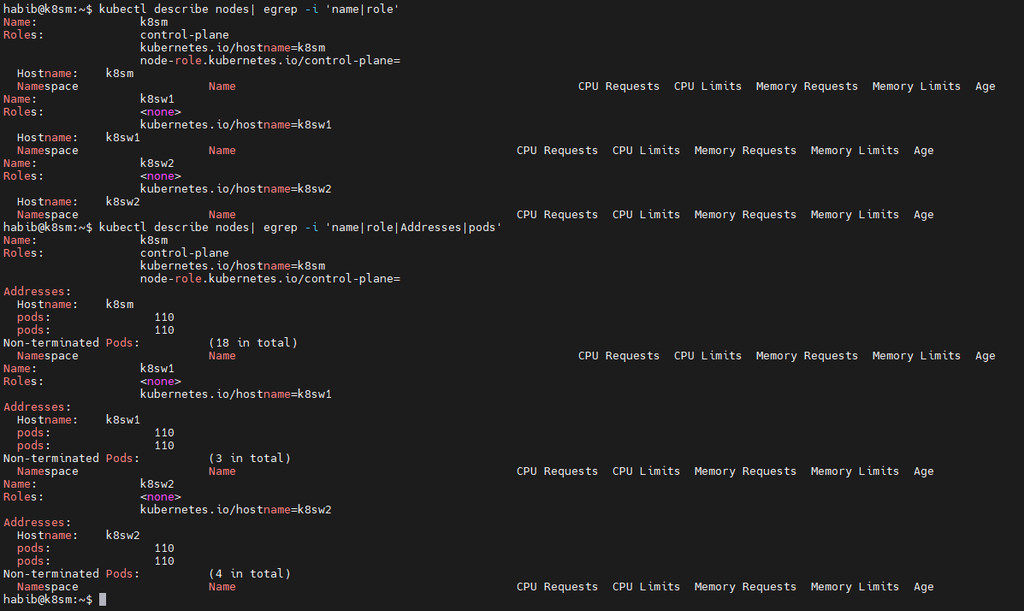
kubectl describe nodes: remove grep to view all
3. Pod Information and Management
# List pods in default namespace
kubectl get pods
# List pods across all namespaces
kubectl get pods -A
Show detailed pod information
kubectl get pods -o wide
Create an nginx pod
kubectl run nginx –image=nginx
Describe a pod
kubectl describe pod nginx
View pod logs
kubectl logs nginx
Follow logs in real time
kubectl logs -f nginx
Execute a command inside a pod
kubectl exec nginx — ls /
Open an interactive shell
kubectl exec -it nginx — /bin/sh
Delete a pod
kubectl delete pod nginx
4. Namespace info and management
# List namespaces
kubectl get namespaces
# Create namespace
kubectl create namespace learning
List pods in namespace
kubectl get pods -n learning
Set default namespace for current context
kubectl config set-context –current –namespace=learning
Return to default namespace
kubectl config set-context –current –namespace=default
Delete namespace
kubectl delete namespace learning
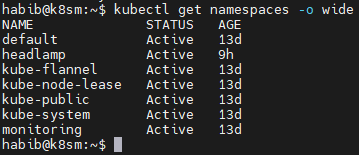
Check all namespaces
kubectl get namespaces -o wide
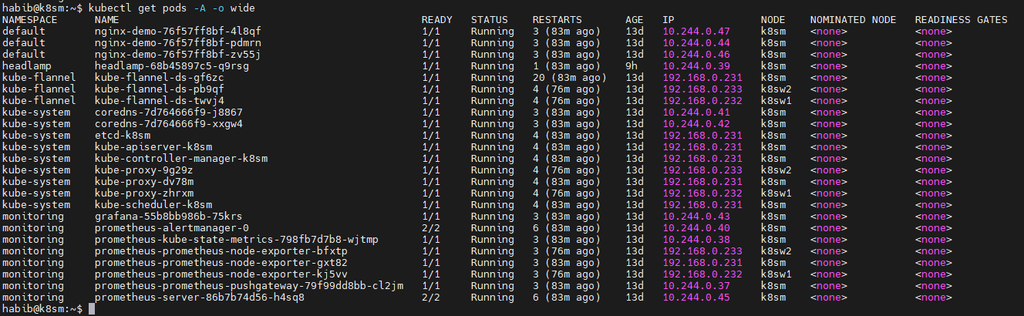
Check pods across ALL namespaces
kubectl get pods -A -o wide
Find failed or pending Pods:

kubectl get pods -A | grep -vE ‘Running|Completed’

Note: there are no unhealthy pods right now
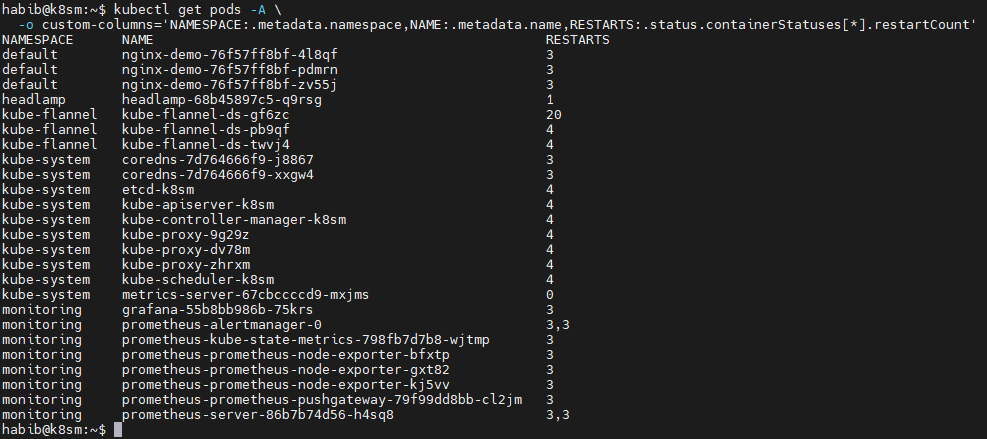
Find Pods with recent restarts:
Inspect a problematic Pod:
kubectl describe pod <pod-name> -n <namespace>
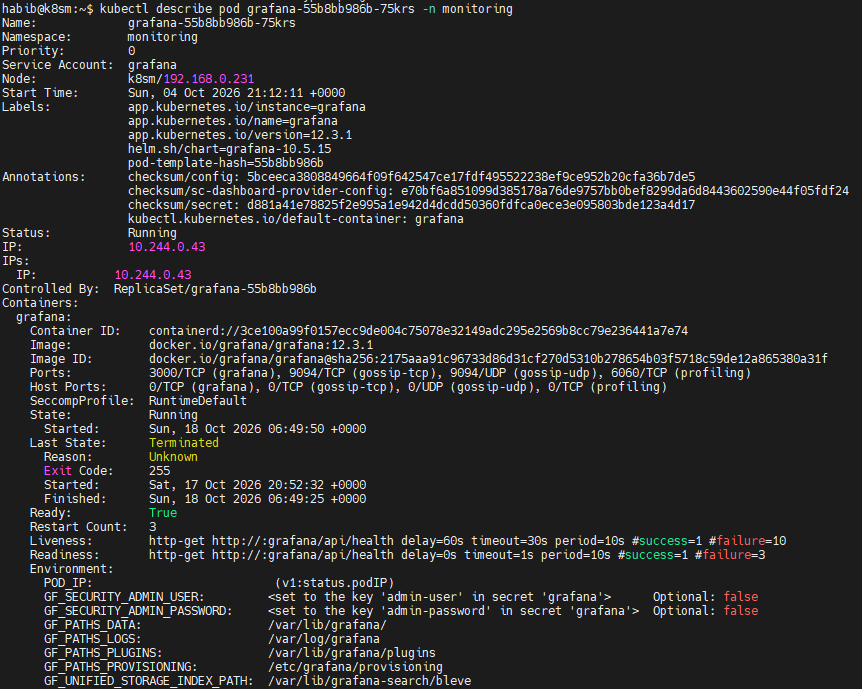
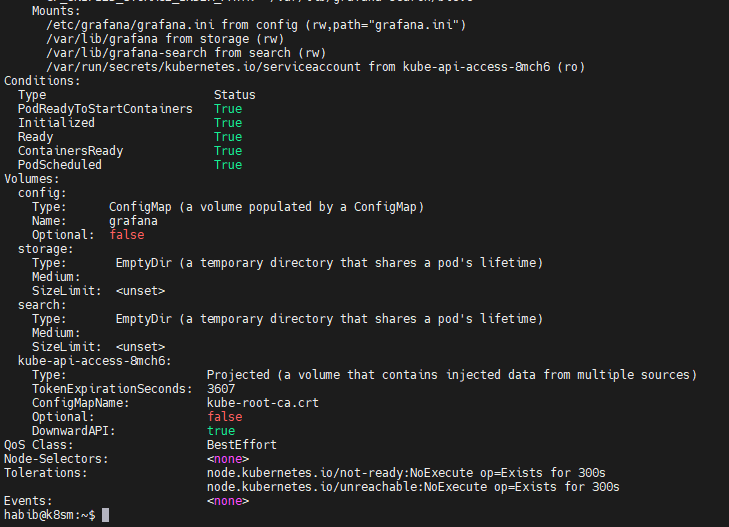
kubectl logs <pod-name> -n <namespace> --tail=100
5. Deployment Management
Create deployment
kubectl create deployment webapp –image=nginx
# List deployments
kubectl get deployments
# Scale deployment to 3 replicas
kubectl scale deployment webapp –replicas=3
# Check deployment rollout
kubectl rollout status deployment/webapp
# Update container image
kubectl set image deployment/webapp nginx=nginx:1.27
# Check rollout history
kubectl rollout history deployment/webapp
# Roll back deployment
kubectl rollout undo deployment/webapp
# Delete deployment
kubectl delete deployment webapp
5. Services and Networking
List services
kubectl get svc
Expose deployment using NodePort
kubectl expose deployment webapp –type=NodePort –port=80
# Show service details
kubectl describe svc webapp
# Show EndpointSlices
kubectl get endpointslices
# Forward local port to service
kubectl port-forward svc/webapp 8080:80
List network policies
kubectl get networkpolicies -A
# Delete service
kubectl delete svc webapp
5. Check Kubernetes system components
kubectl get pods -n kube-system -o wide

kubectl get pods -n kube-flannel -o wide

6. Check services and describe
kubectl get svc -A
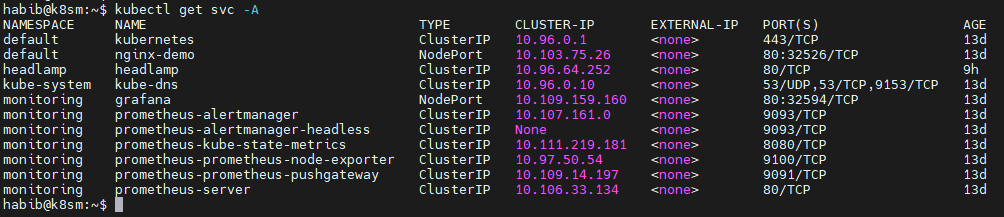
kubectl get svc metrics-server -n kube-system

kubectl describe svc metrics-server -n kube-system
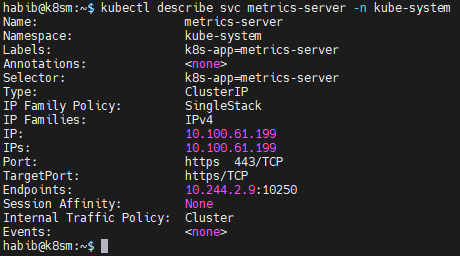
kubectl get endpoints -A
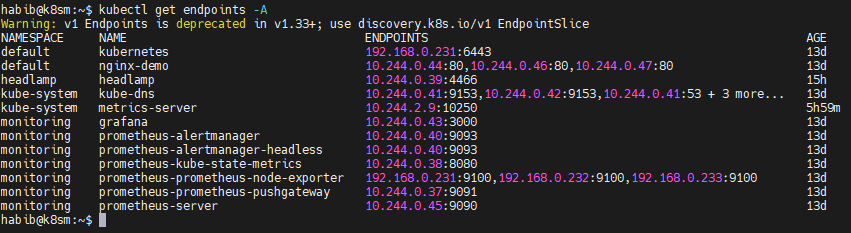
kubectl get endpoints metrics-server -n kube-system

kubectl get pods -n kube-system -l k8s-app=metrics-server -o wide

Check NodePort Services:

6. Troubleshooting Commands
# View cluster events
kubectl get events -A
# Sort events by time
kubectl get events -A –sort-by=.lastTimestamp
# Investigate pod failures
kubectl describe pod POD_NAME
# Logs from previous container instance
kubectl logs POD_NAME –previous
# Show pod CPU and memory
kubectl top pods -A
# Find pending pods
kubectl get pods -A –field-selector=status.phase=Pending
# Identify pod placement
kubectl get pods -A -o wide
Note: kubectl get componentstatuses is a legacy command; avoid it for modern health checks.
7. Node Administration
Prevent new workloads from being scheduled
kubectl cordon k8sw1
Drain node for maintenance
kubectl drain k8sw1 –ignore-daemonsets
Allow scheduling again
kubectl uncordon k8sw1
Show node labels
kubectl get nodes –show-labels
Add a node label
kubectl label node k8sw1 environment=lab
Remove the label
kubectl label node k8sw1 environment-
WARNING: Draining a node evicts eligible workloads and can interrupt applications.
kubectl get deployments -A
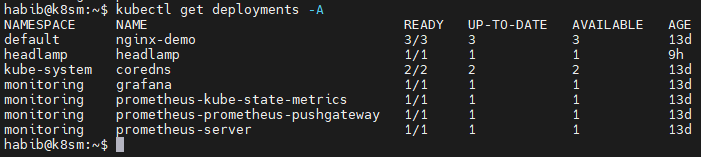
kubectl describe deployment metrics-server -n kube-system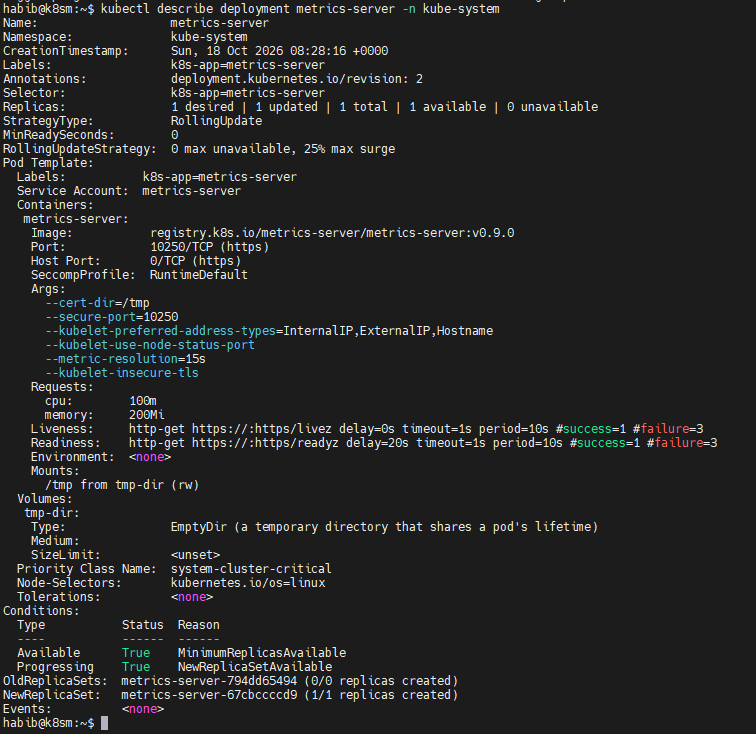

View Deployment logs:

View Deployment resource usage:

8. Check daemon set
kubectl get daemonsets -A
kubectl get daemonsets -A -o wide

kubectl describe ds prometheus-prometheus-node-exporter -n monitoring
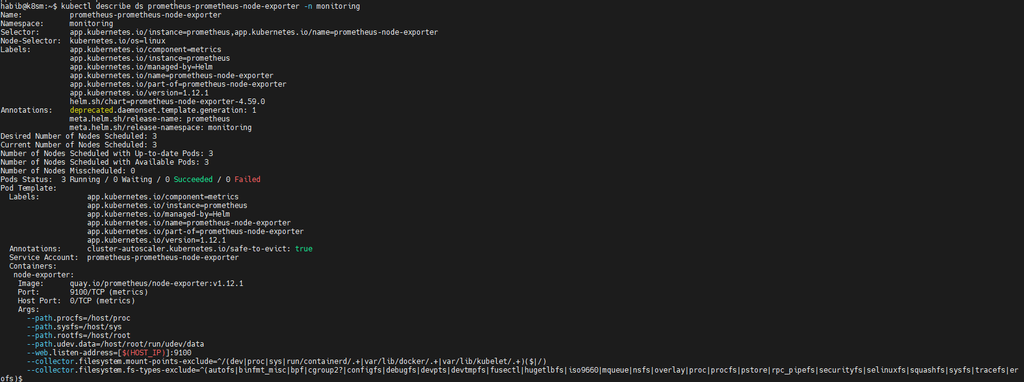
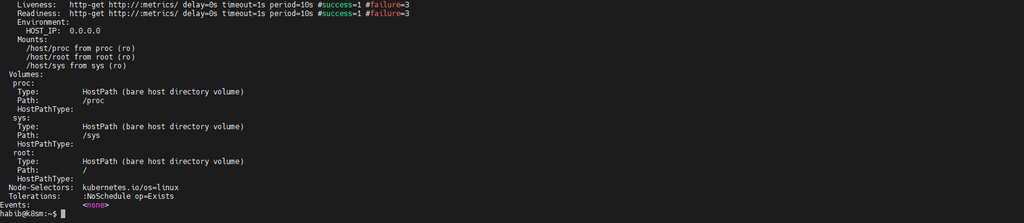
Troubleshoot unhealthy daemon set:

- CONFIGURATION AND YAML
Configuration And YMAL
Show pod YAML
kubectl get pod nginx -o yaml
Export deployment YAML
kubectl get deployment webapp -o yaml
Apply configuration
kubectl apply -f deployment.yaml
Validate configuration against API
kubectl apply –dry-run=server -f deployment.yaml
Show differences before applying
kubectl diff -f deployment.yaml
Explain Kubernetes resource fields
kubectl explain pod.spec
Explain container resource limits
kubectl explain pod.spec.containers.resources
9. Check recent cluster events
kubectl get events -A –sort-by=’.lastTimestamp’ | tail -30

9. K8S Resource Discovery
List API resources
kubectl api-resources
List available API versions
kubectl api-versions
Get common resources
kubectl get all
Get resources across all namespaces
kubectl get pods,deploy,svc,ds,sts -A
Get DaemonSets
kubectl get daemonsets -A
Get StatefulSets
kubectl get statefulsets -A
Get ConfigMaps
kubectl get configmaps -A
Get Secrets (names only)
kubectl get secrets -A
kubectl top nodes:
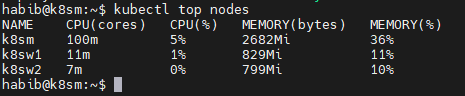
11. Check pod resource usage
kubectl top nodes
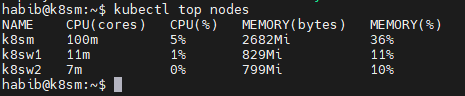
kubectl top pods -A
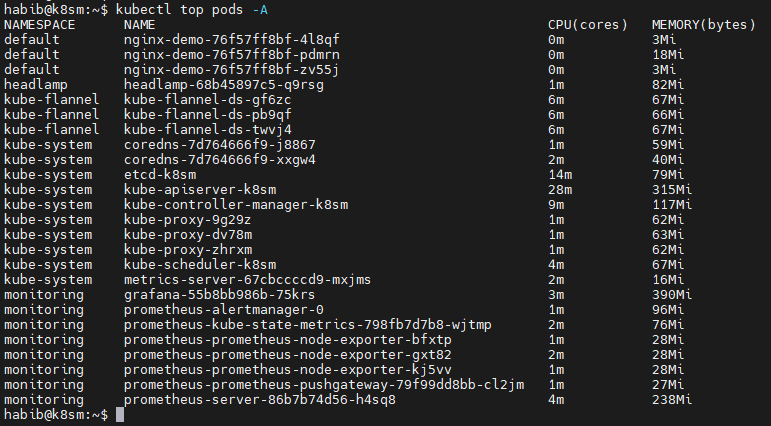
To get Node and Pod metrics you have install metrics-server service on kube-system name spaces

- RECOMMENDED LEARNING ORDER FOR CKA
Day 1: Cluster, nodes, namespaces and pods
Day 2: Deployments, ReplicaSets and scaling
Day 3: Services, networking and DNS
Day 4: ConfigMaps, Secrets and storage
Day 5: DaemonSets, StatefulSets and Jobs
Day 6: Scheduling, taints, tolerations and node maintenance
Day 7: Troubleshooting, logs, events and YAML
CKA PRIORITIES
Focus on:
kubectl get
kubectl describe
kubectl logs
kubectl exec
kubectl apply
kubectl explain
kubectl rollout
kubectl cordon
kubectl drain
kubectl uncordon